Blog
Predictive Dialer for Insurance Agents: How to Choose in 2026
Find the best predictive dialer for insurance agents in 2026. Compare dialing modes, improve lead follow-up speed, and boost your sales call productivity.

More dials don’t automatically mean more conversations. A predictive dialer for insurance agents can reduce time spent manually calling, but speed only helps when the dialing mode, lead timing, and compliance process work together.
Manual dialing can leave agents with extra steps between conversations. It’s also easy to compare dialers by headline speed and overlook the practical differences between predictive, power, and preview modes. Faster calling raises important questions about consent, abandoned calls, and whether leads are ready to work.
This guide explains how predictive dialing works and when it fits an insurance sales workflow. You’ll learn how to match a dialing mode to your team and lead flow, plan timely follow-up, and connect lead delivery, calls, and CRM activity. ClosrLeads provides OTP phone-verified insurance leads, real-time CRM delivery, and a built-in dialer for working purchased leads. The goal is a faster, more organized workflow, not speed for its own sake.
Key Takeaways
- Choose a predictive dialer for insurance agents based on team size, agent availability, and campaign workflow, not speed alone.
- Compare predictive, power, and preview dialing to find the right balance of pace and agent control.
- Match follow-up timing to lead freshness, and set call capacity so agents can handle live connections effectively.
- Build a disciplined workflow around campaign setup, consent records, handoffs, and ongoing monitoring. Documentation supports the process but doesn’t guarantee every call scenario is compliant.
- Connect lead delivery, dialing, and CRM activity into a clear workflow. ClosrLeads offers OTP phone-verified leads, real-time CRM delivery, and a built-in dialer for purchased leads.
What a Predictive Dialer for Insurance Agents Does, and Does Not Do
A predictive dialer is software that calls multiple numbers while estimating when agents will be available to handle answered calls. It adjusts dialing pace around expected agent capacity, rather than requiring an agent to select and dial every number. For insurance teams, a predictive dialer for insurance agents can reduce repetitive dialing and free up more agent time for live conversations. That’s an operational benefit, not a promise of more sales or better contact rates.
The dialer manages outbound calling mechanics. It doesn’t qualify a prospect, explain coverage, assess needs, or provide insurance advice. Those responsibilities remain with the agent. A fast connection is useful only when the agent has enough context and time to hold a clear, relevant conversation.
Call volume alone doesn’t determine whether predictive dialing fits. Consider how fresh the leads are, how many agents are available, and whether the team can handle answered calls at the pace the campaign generates. If agent capacity or lead quality doesn’t match the calling plan, a high-speed setup can create pressure rather than improve the workflow.
How predictive dialing moves a prospect into an agent conversation
The process starts with campaign setup: the team organizes its calling list and defines how the campaign should run. The dialer places outbound attempts, identifies answered calls, and routes an eligible live connection to an available agent. A predictive dialer uses estimated agent availability to set its pace. That doesn’t mean every attempt reaches a person or every answer connects to an agent instantly.
Configuration shapes the handoff. If the system dials faster than the available agents can handle, a live answer may not align with agent availability. Campaign settings, staffing, call handling, and applicable requirements all affect how the workflow should operate. Aim for a controlled rhythm, not maximum dials at any cost.
Predictive dialing versus manual calling
With manual calling, an agent selects a prospect’s number and places each call individually. This gives the agent direct control over pace and a chance to review the lead before dialing, but repeated steps take time between conversations. Automated dialing shifts number selection and call placement to software, which may reduce that administrative work.
Time saved is useful only when agents are prepared to use it well. Before speaking, an agent still needs accurate lead context, a clear reason for the call, and room to listen and respond. For example, an agent following up on an inquiry may need to understand what prompted it. An older lead may call for a different opening. A dialer can organize attempts, but it can’t supply that preparation or replace an agent’s judgment.
Use the tool to remove friction from calling, then assess whether its pace suits the people and leads behind each campaign. Predictive dialing is a workflow choice, not a substitute for thoughtful follow-up.
Predictive, Power, or Preview Dialer: Match the Mode to Your Insurance Team
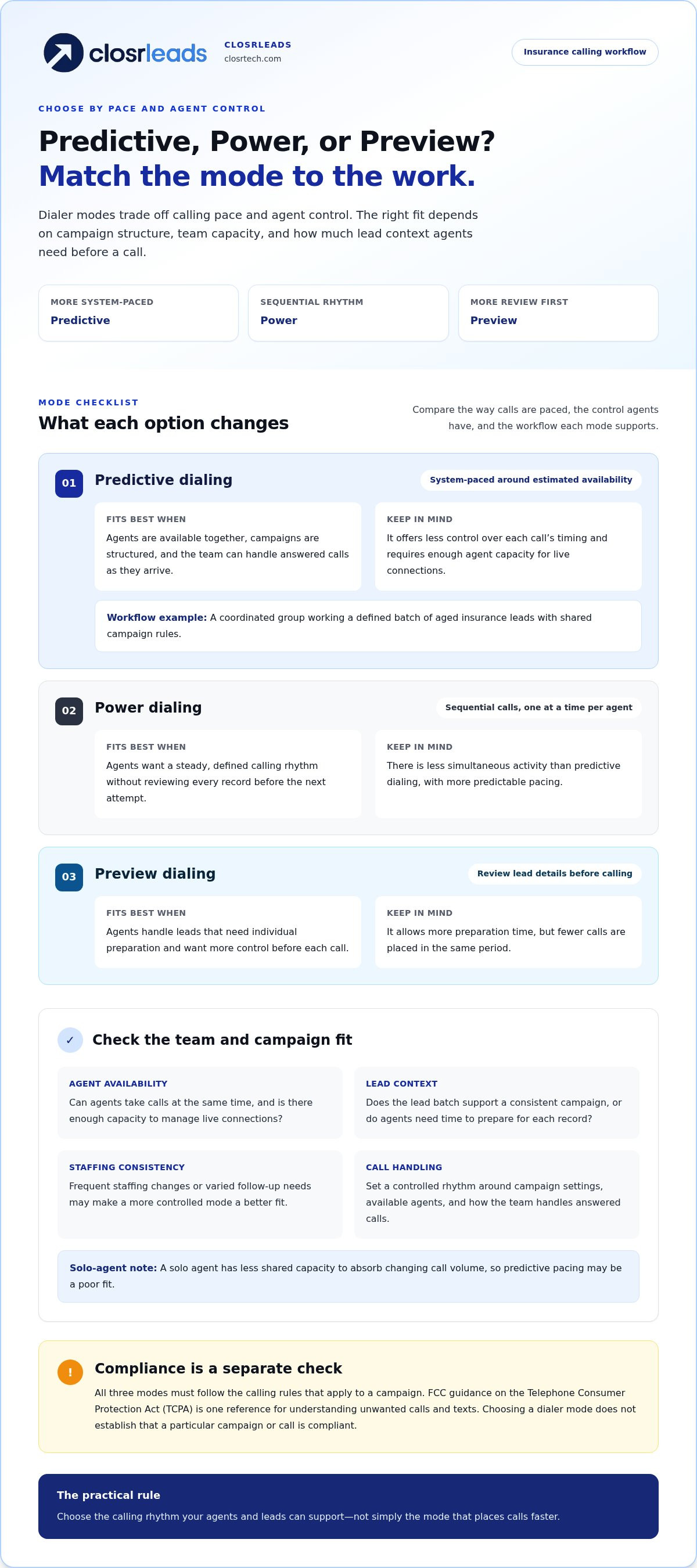
Dialer modes make different trade-offs between speed and agent control. Predictive dialing estimates agent availability to pace outbound calls. Power dialing places calls sequentially, while preview dialing lets an agent review lead details before placing a call. The right predictive dialer for insurance agents depends on campaign structure, team capacity, and lead context, not on a universal ranking.
| Mode | Agent control | Pace | Team fit | Key trade-off |
|---|---|---|---|---|
| Predictive | Less control over each call’s timing | System-paced around estimated availability | Coordinated teams running structured campaigns | Can increase call activity, but requires capacity to handle answered calls |
| Power | More control than predictive | Sequential calls, one at a time per agent | Agents who want a steady, defined calling rhythm | Less simultaneous activity, with more predictable pacing |
| Preview | More control before each call | Slower, with time to review lead context | Agents handling leads that need individual preparation | More preparation time, fewer calls placed in the same period |
All three modes must be used within the calling rules that apply to a campaign. The FCC’s guidance on the Telephone Consumer Protection Act (TCPA) is one reference for understanding unwanted calls and texts. Choosing a dialer mode doesn’t establish that a particular campaign or call is compliant.
When predictive dialing may fit an agency
Predictive pacing may suit a team with agents available together, a consistent campaign, and enough capacity to manage calls as they’re answered. For example, a group assigned a defined batch of aged insurance leads could follow shared campaign rules and coordinate coverage. A solo agent has less shared capacity to absorb changing call volume, so the same pacing may be a poor fit.
Before choosing predictive dialing, consider whether agents are ready to take calls at the same time, whether the lead batch supports a consistent campaign, and how the team will handle live connections. If staffing changes often or agents switch between different types of follow-up, a more controlled mode may fit better. For organizations evaluating specialized calling tools and communication services to run structured campaigns, providers like Calls-Are-Us offer outreach capabilities designed to match specific operational demands.
When power or preview dialing may be a better workflow
Power dialing suits agents who want sequential call activity without reviewing each record before the next attempt. Preview dialing adds time to prepare, which can help when lead details shape the opening conversation. OTP verification and consent records can provide useful contact context. Read the OTP-verified insurance leads guide for more on verified records.
Lead freshness matters, too. A new inquiry may call for prompt attention, while an aged lead may benefit from a deliberate opening informed by the available record. Choose the mode that supports the response each lead needs instead of forcing every lead into one pace. ClosrLeads’ built-in dialer for insurance leads helps agents work purchased leads.
The Real Trade-Off: More Calls Versus Better-Timed Insurance Follow-Up
A predictive dialer can reduce the time agents spend selecting numbers and placing calls, potentially leaving more time for live conversations. The trade-off is less room to pause between attempts, review each record, and prepare an individualized opening. The value of a predictive dialer for insurance agents depends on whether added call activity matches team capacity and lead context.
Lead freshness changes the work. A real-time inquiry may call for a prompt response while the prospect’s interest is current. An aged lead is different. It may need a planned follow-up cadence and an opening that accounts for the time since the original inquiry. Sending both through the same fast sequence can overlook what makes each lead worth calling.
How lead freshness changes the follow-up plan
Separate newly delivered inquiries from aged-lead follow-up in the team’s workflow. For each attempt, record when it occurred and what happened, such as a conversation, no answer, or a request for later contact. That history helps agents avoid duplicate effort and choose a sensible next step. For a vertical-specific example, the Final Expense leads guide offers context for considering lead type before setting a follow-up rhythm.
Example: An agency has two agents available to call. A new inquiry arrives while both are speaking with prospects, and a batch of aged leads is also waiting. If the team treats every record as equally urgent, agents may rush through the older leads or leave the new inquiry waiting without a plan. Instead, the team can prioritize the new inquiry, then work aged leads in a planned block when agent capacity allows. The specific workflow depends on staffing and the campaign. The principle is to match lead timing with available attention.
Where speed can create friction
Fast call activity can leave an agent unprepared to respond to a prospect’s interest or questions. A brief pause to review the available lead context can make the opening more relevant and the conversation easier to handle. Speed should remove repetitive dialing work, not the preparation that helps an agent speak clearly.
Calls may go unanswered, and a live answer may not always result in a smooth agent connection. These outcomes deserve attention, but they don’t by themselves explain why a call failed or establish whether a particular rule was breached. Track connection quality alongside attempts: review agent readiness, handoff quality, and whether conversations reflect lead context. More attempts don’t automatically mean more qualified conversations or issued policies.
Keep the scorecard balanced. Call activity shows effort; outcomes and connection quality show whether the workflow is serving agents and prospects. If volume rises while conversations become rushed or poorly matched to lead intent, adjust the pace or separate campaigns by freshness. The important measure isn’t simply how many numbers the dialer reaches. It’s whether the team can follow up with purpose.
Build a Predictive Dialer Workflow Around Consent and Agent Capacity
A sound setup starts before the first call. Define the campaign audience, the records it will use, and how many agents can handle connections. Then test the workflow at a controlled pace. A predictive dialer for insurance agents can support an organized calling process, but consent records and dialer settings don’t guarantee that every call scenario complies with applicable requirements.
Review consent, calling rules, and records before launch
For each lead, identify the contact information and consent documentation available, along with relevant outreach history or contact restrictions. OTP phone verification can help validate a phone number, but it doesn’t establish that every dialing practice or use of that number is compliant. Treat records as inputs to a careful process, not as blanket authorization.
TCPA and Do Not Call requirements need current review. Requirements can vary by campaign and jurisdiction, so have qualified compliance counsel assess the rules that apply to your outreach before launch. Keep supporting records organized and make sure agents know how to handle a prospect’s request not to be contacted.
Set pacing around real agent availability
Predictive pacing should reflect the agents who are actually staffed and ready to take calls, not the team’s theoretical maximum. A scheduled break, meeting, or shift change can affect real capacity. Start with a small pilot, review how calls move from answer to agent, and adjust the workflow before expanding activity. A controlled test can reveal handoff issues before the full campaign runs at a pace agents can’t sustain.
Use this ordered setup sequence:
- Define the campaign. Specify the lead group, outreach purpose, and intended follow-up process.
- Review contact records. Check the available consent documentation, lead details, and relevant contact history.
- Set agent capacity. Base initial pacing on agents who are available to handle live connections.
- Test call handoffs. Run a limited pilot and note whether answered calls reach ready agents smoothly.
- Monitor and adjust. Review attempts, conversations, dispositions, and handoff issues through the team’s established process.
Supervisors should interpret indicators together. Call attempts show activity; conversations and dispositions add context; handoff observations can reveal workflow friction. No single metric, even a favorable one, proves compliance. Use routine reviews to spot patterns, document follow-up actions, and consult qualified counsel when legal interpretation is needed.
For purchased insurance leads, a built-in dialer can bring lead work and calling together. Explore the built-in dialer for purchased leads as part of a process that keeps records, agent availability, and follow-up organized.
Connect Insurance Leads, Dialing, and CRM Follow-Up with ClosrLeads
A dialing workflow is only as organized as the leads and records behind it. ClosrLeads brings insurance lead purchasing and lead-working tools into one process: purchase leads, work purchased leads with the built-in dialer, and receive real-time leads directly in your CRM. This connects lead delivery and follow-up in a documented workflow.
When comparing a predictive dialer for insurance agents with other ways to work leads, keep the functions clear. A predictive dialer changes how calls are paced around agent availability. ClosrLeads provides a built-in dialer for working purchased leads, along with real-time CRM delivery for incoming leads. The best setup still depends on your team, lead timing, and calling process.
What the ClosrLeads lead-and-dialer workflow includes
Each lead includes OTP phone verification and TCPA-compliant consent records. These provide useful information for reviewing contact details and organizing outreach. They don’t guarantee that every dialing method, campaign, or call scenario complies with applicable requirements, so agents still need a disciplined process for reviewing records and following current rules.
A replacement guarantee applies to invalid contacts. It addresses invalid contact records, not sales outcomes or the likelihood that a prospect will answer. Keep that distinction in mind when assessing lead quality.
In practice, the workflow connects three steps:
- Purchase insurance leads suited to your sales focus.
- Work purchased leads using the built-in dialer.
- Receive real-time leads directly in your CRM, where your team can manage lead activity and follow-up.
Lead categories such as Final Expense, Veteran, IUL, Trucker, and Mortgage Protection are examples of insurance verticals. Follow-up needs can differ by lead type, so consider the timing and process that suit each campaign.
Choose a lead workflow that supports your sales process
Start with three practical questions: Which insurance vertical are you focused on? Do you need real-time leads, aged leads, or a mix? How much follow-up can your agents consistently manage? Your answers help shape a workable plan for lead intake, calling, and CRM activity without assuming one dialing mode fits every team.
For example, an agent working a purchased batch can use the built-in dialer as part of lead follow-up, while real-time leads can flow directly into the user’s CRM. OTP verification and consent records provide contact-level context as agents manage outreach. Keep records and outcomes connected to your workflow, and review the process as team capacity or lead priorities change.
Explore ClosrLeads’ insurance leads and built-in dialer to bring lead purchasing, calling, and CRM follow-up into one organized process.
Make Your Next Dialing Decision Deliberate
Your next step doesn’t have to be a major system change. Choose one lead segment and map how it moves from delivery to agent follow-up. Compare that process with your team’s actual availability and the preparation each conversation needs. A predictive dialer for insurance agents is most useful when its pace fits the real workflow, not just a target for more call activity.
Set a clear review point before changing your approach. Look at whether agents can manage the pace, whether records support a relevant opening, and where follow-up gets delayed. Use those observations to refine the process. Deliberate adjustments can help your team build a more manageable calling rhythm while keeping prospect context in view.
Ready to align purchased insurance leads with a practical follow-up workflow? Explore ClosrLeads’ insurance leads and built-in dialer. Take the next step with a plan shaped around your team, your leads, and the conversations you want to handle well.
Frequently Asked Questions
Can a predictive dialer work for a solo insurance agent?
It can, but suitability depends on your call volume, available calling time, and how often you need to review each prospect before dialing. Predictive pacing is based on estimated agent availability, which a coordinated team may be better positioned to manage. A solo agent may prefer preview dialing when lead context matters. Consider whether the pace leaves enough time to prepare and have accurate, respectful conversations.
Does a predictive dialer automatically make insurance calls TCPA-compliant?
No. A dialing mode alone doesn’t establish compliance. Consent, number status, calling practices, and applicable federal and state requirements all matter. OTP phone verification and consent records can provide useful lead-level information, but they don’t guarantee that every future call is compliant. Requirements can depend on the campaign and circumstances. Have qualified compliance counsel review current requirements and how they apply to your calling process.
What happens when a predictive dialer connects a prospect but no agent is available?
The result depends on the platform and its configuration. A prospect may experience a delay before an agent joins, or the connection may be abandoned. That can affect the prospect’s experience and should be examined as a workflow issue, not treated as proof of a specific legal outcome. Test the dialing pace against actual staffing, then review connection outcomes and adjust if agents can’t consistently take answered calls.
Can insurance agents use a predictive dialer with CRM software?
CRM compatibility depends on the dialer and the integrations or workflows it supports. ClosrLeads delivers real-time leads directly into users’ CRMs, and its built-in dialer is for working purchased leads. Map how lead records and follow-up activity move through your CRM process so agents can keep their work organized.
Is a predictive dialer suitable for aged insurance leads?
It can be, but aged leads may need planned follow-up that reflects the available lead details rather than the response rhythm used for a fresh inquiry. Consider agent capacity, consent records, campaign rules, and what the record says before setting the pace. Aged leads aren’t inherently more or less convertible. Review outcomes by lead source and timing to learn which workflows support relevant, well-managed follow-up.
What should an insurance agency measure after adopting a predictive dialer?
Review operational indicators such as call attempts, answered calls, conversations, agent availability, and recorded dispositions. Use consistent definitions across campaigns so supervisors can compare patterns and spot issues, such as answered calls agents aren’t ready to handle. These measures help assess workflow performance, but they don’t prove compliance or guarantee sales. Review them regularly alongside call handling and lead context, then adjust based on what the records show.