Blog
Insurance Lead Delivery to CRM for Routing and Follow-Ups
See how insurance lead delivery to CRM system automates routing, tracks follow-ups, reduces duplicate entry, and helps agents respond faster to opportunities.

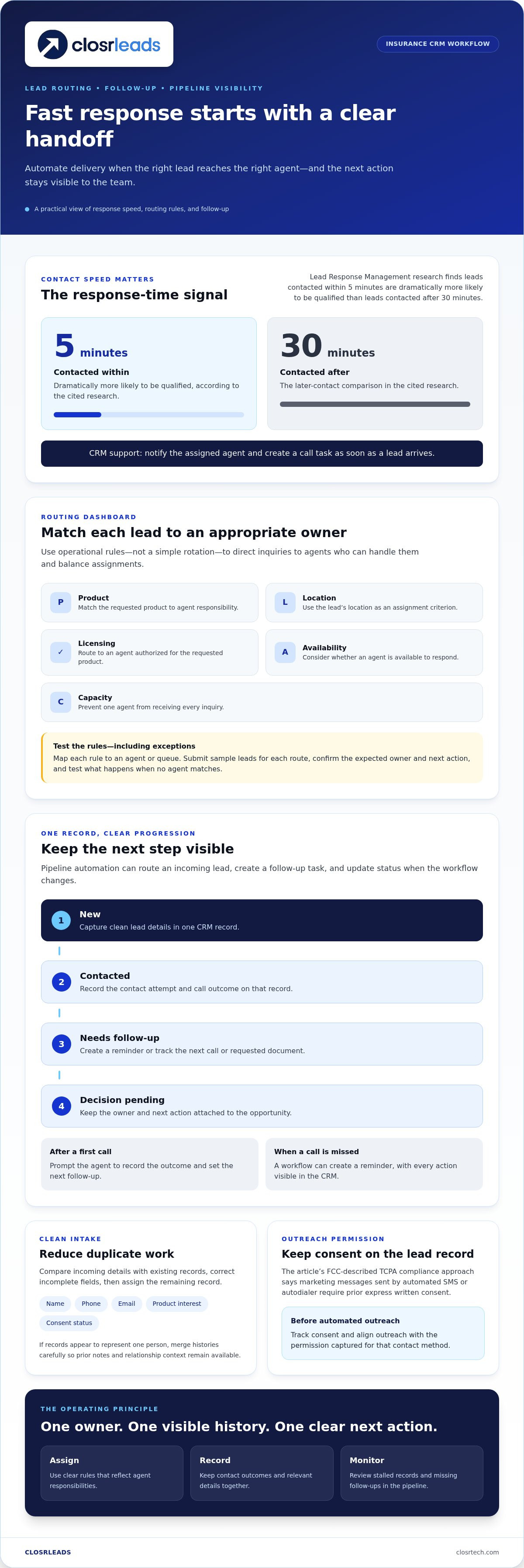
Yes, automate insurance lead delivery to a CRM system when it can assign each lead using clear rules and keep follow-up visible to the team. Routing can account for product, location, licensing, availability, or capacity. Lead Response Management research finds that leads contacted within 5 minutes are dramatically more likely to be qualified than leads contacted after 30 minutes.
Speed matters, but automation helps only when the right information reaches the right person and the next action is easy to track. If intake creates duplicate records or assignments ignore agent responsibilities, the workflow adds friction instead of removing it.
This guide explains how CRM intake, lead assignment, automated follow-ups, and pipeline monitoring work together. You’ll learn when automatic routing makes sense, which rules create a useful workflow, and how to identify gaps that delay the handoff from new lead to active opportunity.
Key Takeaways
- Automate routing when assignment rules are clear and follow-up tasks can be tracked in the CRM. Keep the workflow simple enough for agents to use consistently.
- Route each lead according to relevant factors such as product, location, licensing, availability, and agent capacity.
- Monitor lead status and next actions in one pipeline view so new opportunities don’t disappear between handoffs.
- Make CRM intake reduce duplicate entry: clean, useful lead details should flow into the records agents already work from.
- When comparing lead delivery options, focus on how leads reach your workflow and whether the handoff supports prompt follow-up; a built-in dialer can connect lead delivery with calling.
Automated lead distribution and follow-ups
CRM automation can route an incoming insurance lead, create a follow-up task, and update its pipeline status. It works best when assignment rules and the next action are clear.
Pipeline Automation and Contact Speed
Pipeline automation moves each lead through defined stages and triggers an action when its status changes. This helps prevent unassigned records and forgotten tasks from delaying contact or leaving an opportunity unattended.
Lead Response Management research finds that leads contacted within 5 minutes are dramatically more likely to be qualified than leads contacted after 30 minutes. A CRM can help agents act faster by notifying the assigned agent and creating a call task as soon as a lead arrives.
For example, when an agent marks a first call complete, the workflow can prompt them to record the outcome and set the next follow-up. The pipeline then shows whether the lead is new, contacted, or awaiting a decision.
CRM Workflow Efficiency
CRM workflow automation handles repeatable administrative tasks, such as creating follow-up reminders and updating statuses. This reduces duplicate data entry and gives agents more time for meaningful conversations.
A practical workflow starts with one lead record. Assign an owner, record each contact attempt, and log the result on that record. If the agent requests a document or schedules another call, the CRM can track the next step instead of leaving it in a separate spreadsheet.
Automatic assignment should follow operational rules, not simply rotate through a list. Insurance CRM routing can consider product, location, licensing, availability, or capacity. For example, route a lead to an agent authorized to handle the requested product, and use capacity rules to prevent one agent from receiving every inquiry.
Lead scoring can prioritize follow-up when the CRM applies defined criteria, such as product interest, contact details, or the lead’s stated timing. Use the score as a sorting aid, not a substitute for agent judgment. Set the criteria, show why a record received its score, and review whether agents are acting on higher-priority records first.
Automated follow-ups should reflect the lead’s recorded status. A missed call might create a reminder; a completed conversation might prompt the agent to send relevant information or schedule another contact. For teams seeking external expertise to optimize nurture flows and backend systems, growth agencies such as Vertical Brands can assist with lifecycle messaging and ongoing CRM management. Keep every action visible in the CRM so another agent can understand the history without repeating work.
Contact rules matter, too. According to the Federal Communications Commission, marketing messages sent by automated SMS or autodialer require prior express written consent under the described TCPA compliance approach. Track consent in the lead record, and align automated outreach with the permission captured for that contact method.
Lead routing, assignment, and pipeline monitoring
Routing rules connect incoming leads with agents who can handle them, then track each opportunity through the sales pipeline. Insurance CRM rules can assign leads by product, location, licensing, availability, or capacity. These criteria help agencies direct inquiries to an appropriate owner and maintain a clear customer relationship from first contact onward.
For U.S. consent and TCPA rules, the Telephone Consumer Protection Act governs SMS, automated calls, and consent for outbound contact. According to the Federal Communications Commission, marketing messages sent by automated SMS or autodialer require prior express written consent under the described compliance approach. Record consent and permitted contact details for each lead before triggering outreach.
To set up and test insurance lead routing, define assignment criteria, map each rule to an agent or queue, then test sample records for every route. For example, submit a test lead with a particular product and location, confirm the expected owner, and verify that the CRM records the assignment and next action. Test exceptions too, such as leads with no matching agent.
To deduplicate, validate, and assign leads, compare incoming contact details with existing CRM records, correct incomplete fields, and apply routing rules to the remaining record. Use consistent fields for name, phone, email, product interest, and consent status. If two records appear to represent one person, merge their histories carefully so agents retain prior contact notes and relationship context.
Pipeline monitoring makes lead and opportunity tracking useful after assignment. Define stages that reflect real actions, such as new, contacted, needs follow-up, and decision pending. Each stage should have an owner and a next action. A broker can then review stalled records, identify missing follow-ups, and move active opportunities forward without relying on memory or scattered notes.
Customer relationship management should make handoffs visible, too. Keep call outcomes, lead status, and relevant documents on the same record so a reassigned agent can see what happened. If commission tracking is part of the workflow, distinguish lead progress from commission status. This helps managers assess sales activity without treating an open opportunity as completed business.
Security and privacy risks include unauthorized access, exposed contact details, and sending information to the wrong record. Limit CRM access by role, use secure transfer methods, and review permissions regularly. The Gramm-Leach-Bliley Act applies to financial institutions, including life insurance carriers; the guide also identifies HIPAA Privacy and Security Rules as applying to health insurance lines. A well-designed insurance lead workflow keeps ownership, contact history, and follow-up actions connected.
Insurance lead routing and intelligent distribution
Intelligent distribution uses lead context to choose an appropriate destination instead of sending every inquiry to one shared queue. For insurance agencies, useful context includes the requested product, lead source, location, licensing, and team capacity. A Veteran Insurance lead and a Trucker Insurance lead, for example, may require different product knowledge and follow-up paths.
Start by defining the purpose of each rule. Product-based routing can direct a lead to an agent familiar with that coverage. Location rules can separate territories, while licensing criteria help align assignments with an agent’s authority. Capacity rules can balance inquiries across eligible agents. Combining criteria creates more precise distribution, but keep the rules clear enough for managers to explain and maintain.
Source tracking adds another layer. Store the original source and campaign details with the CRM record, then use those fields to compare lead flow and pipeline activity. For teams generating prospects through targeted paid campaigns, working with specialized digital marketing partners like XcellentDigital helps align ad funnels directly with downstream CRM capture. If a source produces inquiries that need a particular product team, the CRM can route those records accordingly. Keep the source visible after assignment so agents retain context and managers can distinguish acquisition data from later customer relationship activity.
- Route by fit: Match product, territory, and licensing requirements to the appropriate agent or team.
- Preserve context: Carry source details and prior interactions into the assigned CRM record.
- Handle exceptions: Send records without a clear match to a monitored queue for review.
Integration matters when lead records need context from other insurance systems. Insurance organizations can connect CRM platforms with rating engines, agency management system databases, claims feeds, and document management tools through secure APIs. An insurance CRM complements an Agency Management System: the AMS handles back-office operations, while the CRM supports acquisition, marketing, renewals, and customer service.
That distinction helps prevent a lead workflow from becoming a second back-office system. Keep prospect ownership, contact history, and sales activity in the CRM, and use connected systems for the operational information they manage. For example, a claims feed can display loss reports, adjuster notes, and payout statuses in a client record, giving an agent relevant context without making claims handling part of lead routing.
Intelligent distribution can support existing customer relationships, too. Household roll-ups connect policyholders with family members, business entities, and covered assets, helping agents view related records together. That view may reveal a relevant conversation opportunity, but the CRM should still distinguish a new lead from an existing policy or service request. Clear record types prevent a cross-sell opportunity from being mistaken for an unworked inquiry.
Review routing outcomes using assignment history, source data, and pipeline status. If records repeatedly land in an exception queue, adjust the matching criteria or clarify agent coverage. If connected systems create incomplete records, correct field mapping before expanding distribution. A well-maintained integration creates a cleaner handoff and a more coherent customer relationship view.
CRM lead intake and delivery
CRM intake works best when incoming records have consistent fields, clear ownership, and useful source details. The delivery method affects how reliably that information reaches agents’ workflows.
Direct CRM Vendor Integrations
A direct CRM integration is a native connection that transfers lead data from a vendor into a specific CRM. It matters because mapped fields can arrive in the intended record without agents retyping information.
There is no universal vendor-to-CRM pairing for every insurance agency. Assess the specific connection by checking which fields transfer, whether ownership and source are preserved, and how errors appear. For example, a useful integration should distinguish a lead’s phone number from their product interest instead of placing both in a generic notes field.
Lead Delivery Methods
Lead delivery methods move records into a CRM through direct integration, a webhook, email, or third-party middleware. The right fit depends on the agency’s capabilities and whether intake needs to be structured and prompt.
A direct integration maps data between systems. A webhook sends an event when a lead is created, while email delivers details for manual or automated processing. Middleware connects systems through an intermediary, which can help when a direct connection is unavailable but adds another point to manage. Whatever the method, test field mapping, failed deliveries, duplicate handling, and the resulting lead status.
CRM Integrations and APIs
CRM APIs transfer structured lead details and can connect a CRM with insurance systems. This matters when intake needs to preserve context across an agency’s sales and management workflows.
Insurance organizations can connect CRM platforms with rating engines, agency management system databases, claims feeds, and document management tools through secure APIs. For example, a CRM can receive a lead’s source and product interest, while an integration brings relevant rating or policy context into the appropriate record. An insurance CRM complements an Agency Management System, which handles back-office operations.
Before activating delivery, map every incoming field to its destination. Include contact details, product interest, source, consent status, and required assignment fields. The lead record should also show when it arrived and whether an agent owns it. These details make it easier to trace a failed handoff without searching inboxes or reconstructing the interaction.
Test the complete path with sample records before relying on automation. Send a test lead, confirm that the CRM creates or updates the correct record, and check its owner and status. Then test an incomplete record and a duplicate to see how the workflow responds. A validation queue can hold records with missing fields for review rather than pushing unusable data into the active pipeline.
Make delivery errors visible. A failed API request, an unreadable email format, or a mismatched rating field can interrupt intake. Assign someone to review error logs and retry corrected records. This gives the agency a clear view of what reached the CRM, what needs attention, and which lead details support the next customer interaction.
Which insurance lead vendors integrate directly with popular CRMs?
There is no vendor-to-CRM pairing that suits every insurance agency. Direct integration depends on the lead vendor’s supported destinations and the CRM’s connection options. Start with the CRM agents already use, such as Salesforce, then check whether each vendor can deliver records into that specific environment.
Look beyond a claim that a vendor “integrates with CRM.” A useful connection transfers the fields agents need, preserves source information, and creates or updates the intended record. For a Veteran Insurance lead, for example, check whether the product interest remains identifiable after delivery. Confirm how the connection handles missing fields, duplicate records, and failed transfers.
Use a short comparison to assess vendor and CRM fit:
- Destination: Does the vendor send leads directly into your chosen CRM?
- Field mapping: Can contact details, source, and product interest reach the correct CRM fields?
- Ownership: Can the record enter the right queue or agent workflow?
- Error handling: Can your team identify records that failed to transfer?
Direct delivery is only one connection method. A vendor may connect through an API, webhook, email, or middleware, and each option changes how data is mapped and where errors appear. For example, an API connection can pass structured fields, while email may need additional processing before the details become a CRM record. Compare the entire handoff, not just the connection label.
Test the vendor-to-CRM path with sample records before using it for active sales. Send a complete record, then confirm the CRM field mapping, source, and destination. Repeat with a missing field and a potential duplicate. In Salesforce, for example, inspect the resulting lead record to make sure information appears where agents expect it.
Ask how the connection handles changes, too. If an agency renames a CRM field or changes its assignment process, the data mapping may need an update. Identify who monitors transfer errors and how staff can see a failed delivery. These details matter because an integration that silently drops a record can interrupt the handoff before an agent acts.
Choose the vendor whose delivery method fits your CRM setup and staff workflow. If you’re evaluating insurance lead delivery, explore lead delivery options and consider how direct CRM delivery can fit your follow-up process.
A vendor-built insurance CRM implementation for a mid-tier P&C carrier typically takes 9 to 14 months, making implementation scope and timing important alongside lead-delivery fit.
ClosrLeads: Final Expense Leads
ClosrLeads is a practical option for agents who want insurance leads connected to a focused follow-up workflow. Its Final Expense Leads, Veteran Insurance Leads, and IUL Leads support agents working in these insurance verticals.
ClosrLeads provides real-time and aged insurance leads that are OTP phone-verified and TCPA-compliant, with documented consent records. Its Built-In Dialer delivers leads directly into users’ CRM systems, helping agents move from intake to calling without manual entry. The replacement guarantee applies to invalid contacts.
Choose this approach when you’re ready to pair lead delivery with CRM-based follow-up. It may not suit teams that need a different lead category or a workflow built around another contact method. Visit closrtech.com to explore ClosrLeads.
Make Your CRM Workflow Ready for the Next Lead
Make your lead process measurable by deciding who owns each incoming record, what information agents must capture, and how managers will identify stalled follow-ups. Review the workflow as your product mix or team responsibilities change. Clear ownership keeps the CRM useful as the business grows.
An effective insurance lead delivery to CRM system should support how agents actually work, not add administration. ClosrLeads offers Final Expense Leads, Veteran Insurance Leads, and IUL Leads, helping agents align lead flow with their focus. Start by identifying the category and follow-up process your team is ready to manage.
Use your next workflow review to identify where lead intake or assignment needs a stronger connection. Contact ClosrLeads to discuss your lead flow and consider how your CRM can support consistent follow-up. A clearer process gives your team a stronger foundation for every new opportunity.
Frequently Asked Questions
Should an insurance CRM route leads automatically?
Yes, automate routing when clear rules can match each lead to an appropriate agent or team. Keep a manual review path for exceptions, such as incomplete records or inquiries that do not match an assignment rule. For example, a small agency might route by product first, then send unmatched leads to a shared queue. Review outcomes regularly so routing reflects licensing, workloads, and team responsibilities.
How does insurance lead delivery to a CRM system work?
A lead is captured, its details are transferred into a CRM record, and the record becomes available for follow-up. The CRM can then connect it to an owner, activity history, and next action. For example, check that the lead’s contact details and product interest appear in the correct fields before agents begin working it. Testing a sample record can reveal mapping problems early.
How quickly are insurance leads delivered to a CRM, and what delivery methods are available?
Delivery speed depends on the vendor’s process and connection method; real-time delivery sends a lead as it is generated. Available methods can include direct CRM delivery, webhooks, email, middleware, or CSV, depending on the vendor. ClosrLeads offers real-time CRM delivery and CRM webhook or CSV - your choice. Aged leads are also available for a separate follow-up workflow.