Blog
Insurance Dialer Software: Guide for Insurance Agents
Find the best insurance dialer software for your agency. Compare preview, power, and predictive dialers to speed up follow-ups and close more leads today.

The dialer that makes the most calls isn’t always the one that helps agents follow up best. Manual dialing takes time away from prospect conversations, and switching between lead, CRM, and phone systems adds friction. The right insurance dialer software makes the next call easier to start without burying agents in features they won’t use.
The challenge is choosing a setup that fits your team’s size, lead flow, and calling process. This guide compares preview, power, and predictive dialers, then explains which capabilities can simplify follow-up and where compliance practices still need careful attention. Software can support a disciplined workflow, but it can’t guarantee compliance or sales results.
Lead delivery and dialing work best as connected steps. ClosrLeads pairs OTP phone-verified insurance leads and consent records with a built-in dialer, delivering leads into your CRM for immediate follow-up. The goal is a smoother handoff, so agents spend less time moving between tools and more time speaking with prospects.
Key Takeaways
- Insurance dialer software supports outbound calling, but it doesn’t replace lead generation, CRM, or policy administration.
- Compare preview, power, and predictive dialing by the level of agent control and pace your calling process needs.
- Prioritize CRM compatibility, clear call outcomes, visible follow-up tasks, and a smooth lead handoff over a long list of extras.
- Use a consistent workflow to review each lead, make the call, record the outcome, and set the next action.
- ClosrLeads connects purchased insurance leads with a built-in dialer and real-time CRM delivery to support timely follow-up.
What Is Insurance Dialer Software, and What Does It Actually Do?
Insurance dialer software helps agents organize or automate outbound calls. Depending on the platform and dialing mode, it may show a lead’s number for an agent to call or initiate calls from a lead list. The basic technology is an Automatic dialer, but a dialer is only one part of an insurance sales workflow.
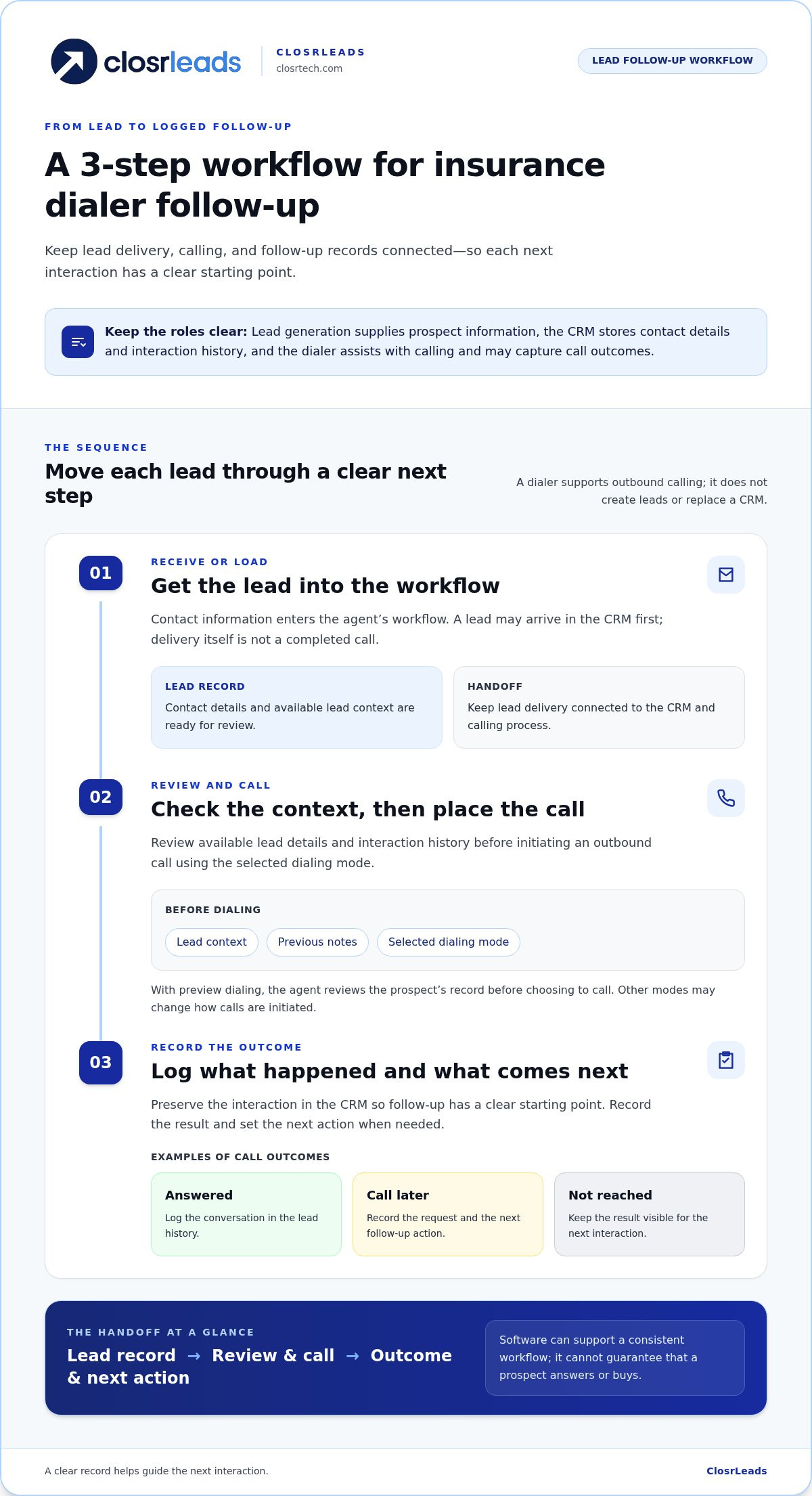
Keep each tool’s role clear. Lead generation supplies prospect information. A CRM stores contact details and interaction history. Policy administration tools support policy-related processes. A dialer assists with calling and may help capture call outcomes. It doesn’t create leads by itself, replace a CRM, or guarantee that prospects answer or buy.
A typical workflow has three steps:
- Receive or load a lead. Contact information enters the agent’s workflow.
- Review and call. The agent checks the available context, then initiates an outbound call using the selected dialing mode.
- Record the outcome. Log the result and next step so the next follow-up has a clear starting point.
How does an insurance dialer work from lead to call?
Lead delivery and dialing are separate steps. A lead may arrive in the CRM first, and the dialer helps the agent act on it. For example, ClosrLeads delivers real-time leads into users’ CRM systems for immediate follow-up. The agent can review the record before placing a call, rather than treating delivery itself as a completed call.
After the call, record whether the prospect answered, requested a later call, or wasn’t reached. A clear CRM record preserves context and helps guide the next interaction, especially when more follow-up is needed. Fields and automation vary by platform, so focus on whether agents can find the lead history and reliably record what happened.
Which insurance teams use dialer software?
Independent agents may use a dialer to organize their own outbound calls and lead follow-up. Agency teams can use one to apply a consistent process across agents, while larger outbound operations may choose dialing modes suited to higher call volumes. The right workflow depends on how leads are assigned, reviewed, and followed up.
Life insurance calls, such as conversations about final expense or mortgage protection, may begin with different prospect needs than health insurance discussions. Scripts, review steps, and follow-up timing can therefore vary by product and team. For more on phone verification and lead context, read the guide to OTP-verified insurance leads. Automation can organize the calling process, but agents still guide the conversation and decide what happens next.
Preview, Power, and Predictive Dialers: Which Calling Mode Fits Your Team?
Dialing modes determine who controls the pace and how much context an agent sees before a call. Labels aren’t perfectly consistent across platforms, so compare what the software actually does, not just the feature name. For insurance dialer software, consider whether the mode fits your lead volume, call complexity, and agents’ capacity to handle live connections.
- Preview: The agent reviews a prospect’s record before choosing to call. This allows more control and preparation, but takes more time to initiate each call.
- Power: The system moves through calls according to its configured workflow, typically placing one call for an available agent at a time. It reduces manual dialing while keeping the agent involved.
- Predictive: The system estimates agent availability and adjusts call pacing, often dialing multiple numbers to connect live answers with agents. It can increase pace, but requires careful attention to call handling and configuration.
When is preview dialing useful for insurance agents?
Preview dialing suits calls where context matters more than raw pace. An agent can review a prospect’s request, previous notes, or other relevant lead details before calling. That preparation can help with a complex life insurance inquiry or follow-up that depends on an earlier conversation. The trade-off is time: agents have more control, but review and initiate each call themselves.
How do power and predictive dialing differ?
Power dialing advances to the next call based on the platform’s setup and agent availability. Predictive dialing automates pacing to keep agents supplied with potential live connections. A faster call sequence also requires reliable staffing and a clear process for handling answers. Test the system’s actual behavior, monitor connection outcomes, and account for applicable calling rules.
Don’t assume a dialer mode makes a campaign compliant. Review how the system handles live answers and consult relevant guidance, including the FTC’s Telemarketing Sales Rule (TSR). The rule’s application can depend on the circumstances, and software alone doesn’t settle legal obligations.
For lower-volume teams, agents handling detailed inquiries, or workflows that depend on careful lead review, preview or power dialing may be a better fit. Predictive dialing may suit higher-volume operations with the staffing and procedures to manage its pace. No mode is universally best. Match the mode to the conversation and team capacity, then assess call outcomes rather than choosing based on speed alone.
For agents working purchased insurance leads, consider how leads arrive and move into follow-up when choosing a dialer. Explore the built-in dialer for insurance lead follow-up as part of that workflow.
What Should You Compare Before Choosing Insurance Dialer Software?
Judge the system by how well it moves a lead into a call and carries the result into the next follow-up. A long feature list means little if agents still copy contact details between tools or lose track of what happened. Compare capabilities against your actual process: how leads arrive, which CRM agents use, how calls are handled, and what managers need to see.
Which integrations and reporting capabilities matter most?
Start with a practical test: can an agent open a lead, understand its context, place a call, and log the result without duplicating work? Confirm that relevant lead details reach the CRM and that call outcomes and next actions remain visible to the people responsible for follow-up. A useful report answers a decision-making question, such as which leads need attention or where records are incomplete. Dashboards that don’t guide an action add noise.
How should agencies evaluate compliance-related controls?
Separate documentation tools from compliance responsibility. Consent records can preserve relevant lead information, and dialer controls may support an agency’s calling process. Neither guarantees that every call meets applicable requirements. Agencies remain responsible for their procedures, list management, and use of the Telephone Consumer Protection Act (TCPA) and Do Not Call rules as they apply to their activity.
Review current requirements using authoritative sources, including the FTC’s Telemarketing Sales Rule guidance, and seek qualified legal advice about your specific campaign. Choose insurance dialer software that makes records and workflow visible, then ensure your team’s procedures keep pace with current rules.
How Can Agents Build a Faster, More Consistent Follow-Up Workflow?
A repeatable process turns a lead handoff into a clear next action. Keep the steps simple: review the record, make an appropriate call, log the outcome, and assign follow-up. When lead details flow into the CRM agents already use, they spend less time copying information and more time working from a shared record.
What should happen when a new insurance lead arrives?
Give every new lead the same quick review before dialing. Check the available contact details, product interest, and consent record. Then follow your agency’s calling procedures and use the dialer to initiate the call. A prompt handoff makes timely action possible, but it can’t ensure the prospect will answer or be ready to talk.
Close the loop after every attempt. Record a clear outcome, such as “no answer,” “callback requested,” or “conversation completed,” then add the next action and its timing to the working system. Avoid vague notes like “follow up later.” A specific task gives the next agent, or your future self, a useful starting point.
How can a team keep follow-up consistent?
Set shared rules for common outcomes. For an unanswered call, record the attempt and follow the team’s process for what happens next. For a requested callback, note the agreed timing. After a completed conversation, capture the result and any outstanding task. Consistent labels make lead histories easier to understand and help prevent a handoff from ending with an unclear record.
Use CRM reporting to spot process gaps, not just count activity. Look for leads without a recorded outcome, callbacks without a next task, or records stalled between assignment and agent action. Review patterns with the team and adjust the workflow where handoffs break down. For products where timing is relevant, explore the guide to real-time mortgage protection leads.
Insurance dialer software can support this routine by connecting calls to lead records and follow-up tracking. ClosrLeads delivers real-time leads into users’ CRM systems and provides a built-in dialer for agents working purchased insurance leads. This can reduce handoff friction, while agents remain responsible for reviewing each record and documenting what happens.
Explore ClosrLeads lead and dialer workflows to see how lead delivery and dialing fit into a connected follow-up process.
How ClosrLeads Connects Insurance Leads With Built-In Dialing
A lead handoff is most useful when it leads to a practical next step. ClosrLeads pairs purchased insurance leads with a built-in dialer for agents working those leads. Real-time leads are delivered into users’ CRM systems for immediate follow-up, connecting lead access, record review, and dialing in one workflow rather than leaving agents to move details manually between disconnected steps.
How does lead delivery support immediate follow-up?
When a lead arrives in the CRM, the agent can review its information and available consent record, then use the built-in dialer to place an outbound call. After the attempt, the agent manages the conversation and records its outcome in the working process. The handoff can reduce unnecessary copying and context switching, but it doesn’t guarantee that a prospect will answer, book an appointment, or purchase a policy.
ClosrLeads leads are OTP phone-verified and include TCPA-compliant consent records. Those records can inform an agent’s review, but software and documentation alone don’t guarantee that every calling activity complies with applicable requirements. Agents remain responsible for following their procedures and applicable rules. ClosrLeads also provides a replacement guarantee for invalid contacts.
Which insurance lead categories can agents connect to this workflow?
Agents can use the lead-and-dialer workflow with Final Expense, Veteran, Mortgage Protection, IUL, and Trucker insurance leads. Prospect needs and conversations differ by product, so review each lead and tailor the discussion rather than relying on a single script or assuming every follow-up works the same way.
For more context on one category, see this Final Expense lead guidance. It adds product-specific perspective while the dialer supports the calling step.
This connected approach makes insurance dialer software part of a lead workflow, not an isolated tool for unrelated contacts. Lead delivery provides the CRM record, and the built-in dialer gives agents a way to act on purchased insurance leads. The agent still reviews the details, makes the call, and decides what follow-up is appropriate. That’s the practical link between access and action.
Explore ClosrLeads insurance leads and built-in dialer to see how lead delivery and dialing fit together.
Put Your Insurance Follow-Up Workflow Into Action
The right insurance dialer software supports a clear process: choose a dialing mode that fits your team, keep lead details and call outcomes visible, and give every follow-up a defined next step. Tools can reduce manual handoffs, but agents still guide each conversation and manage their calling procedures.
ClosrLeads connects purchased insurance leads with a built-in dialer and delivers real-time leads into users’ CRM systems for immediate follow-up. Leads are OTP phone-verified and include TCPA-compliant consent records for agents to review. Those records support the workflow, but they don’t replace an agency’s responsibility to follow applicable requirements.
Ready to connect lead delivery and dialing in your process? Explore ClosrLeads insurance leads and built-in dialer. Build a consistent routine, stay focused on each prospect, and give your team a stronger foundation for timely follow-up.
Frequently Asked Questions
What is insurance dialer software?
Insurance dialer software helps agents organize or automate outbound calls to prospects. Depending on the platform, it may support lead review, call initiation, routing, and activity records. It doesn’t generate insurance policies or ensure prospects answer. Consider how the dialer fits your lead source, CRM, and follow-up process. The software assists with calling, while agents remain responsible for conversations and next actions.
How does an insurance dialer work?
A dialer typically accesses contact records, initiates calls according to its configured mode, and may connect answered calls with agents. The agent handles the conversation and records its outcome. Exact steps vary by platform. A practical workflow also keeps lead context and next actions accessible in the working system, so follow-up can continue from a clear record instead of scattered notes or memory.
What is the difference between a power dialer and a predictive dialer?
A power dialer places calls sequentially according to its setup, while a predictive dialer automatically paces calls based on expected agent availability. Preview dialing gives an agent time to review a contact before initiating a call. The best fit depends on call volume, team capacity, lead context, and system configuration. Don’t choose a mode only because it promises a faster pace; consider how agents will handle the calls it generates.
Can insurance dialer software integrate with a CRM?
Some dialer platforms connect with CRMs, but integrations and data flow differ. Check whether lead details reach the system agents actually use, whether call outcomes can be recorded, and whether follow-up tasks are easy to find. ClosrLeads delivers leads directly into users’ CRM systems for immediate follow-up. Keeping lead details and call activity accessible in one workflow can reduce manual copying and help agents retain context between interactions.
Does using an insurance dialer automatically make calls TCPA-compliant?
No. A dialer can support an agency’s workflow, but using one doesn’t establish that every call meets applicable requirements. Agencies remain responsible for reviewing consent records, managing calling procedures, and keeping their processes current. Requirements may depend on the circumstances and can change. Consult qualified legal or compliance professionals about your specific calling activity, rather than relying on a software feature or marketing statement as a compliance guarantee.
How quickly should agents call a new insurance lead?
Follow up promptly when appropriate, but no single timing promise fits every lead or situation. Build a process that considers the lead’s consent information, your team’s capacity, and applicable calling requirements. Keep the lead record, call outcome, and next action together so suitable follow-up doesn’t get lost. Real-time delivery can support a timely response, but it can’t guarantee that a prospect will answer or be available.
What should I look for when choosing insurance dialer software?
Start with fit: assess lead delivery, CRM compatibility, agent workflow, call outcome records, useful reporting, and the dialing modes your team needs. Consider ease of use and how consent information is handled. Don’t choose based only on headline performance claims. Test whether agents can move from receiving a lead to recording a call outcome and next action without unnecessary manual work. The right setup should support your process, not add complexity.