Blog
Dialer With Leads Included: A Smarter Insurance Sales Workflow
Discover how a dialer with leads included streamlines insurance sales. Connect faster, verify leads with OTP, and optimize your daily sales outreach workflow.

What if the gap between receiving an insurance lead and calling it were measured in moments, not manual data entry? A dialer with leads included brings lead delivery and calling into a more connected workflow, so you can spend less time moving contact details between systems and more time starting conversations.
When leads sit in one platform and your dialer in another, each handoff adds a step. You still need to review the record, organize follow-up, and keep useful lead information accessible. A connected workflow can make those tasks easier to manage. OTP phone verification and TCPA-compliant consent records also give you practical information to review before outreach.
In this guide, you’ll learn how a leads-and-dialer setup works, what to compare when choosing bundled or separate tools, and how real-time and aged leads can fit into your process. You’ll also find practical ways to organize follow-up and evaluate a workflow without confusing convenience with guaranteed sales results.
Key Takeaways
- A dialer with leads included brings lead access and calling into one workflow, but it doesn’t guarantee a prospect will answer or buy.
- Compare setups by how leads are verified and delivered, and how invalid contacts are handled.
- Prepare CRM fields and a consistent call process to keep new leads and follow-ups organized.
- Prioritize prompt follow-up for real-time leads, and use a clear plan to manage aged leads.
- ClosrLeads combines OTP phone-verified insurance leads, TCPA-compliant consent records, CRM delivery for real-time leads, and a built-in dialer.
What Does a Dialer With Leads Included Mean for Insurance Agents?
A dialer with leads included brings lead access and calling together in one workflow. Instead of sourcing contacts in one place and entering them into a separate calling tool, an agent can receive leads and work them through a connected process. The dialer supports calling. It can’t make a prospect answer, create interest, or guarantee a sale.
The lead and the calling tool have different roles. Lead acquisition provides contact records, delivery makes them available to the agent, and dialing supports outreach. Activity tracking, when available, helps organize call outcomes and next steps. These parts may be in one platform or connected across separate systems, so check how leads are delivered and how the workflow connects with your CRM.
Lead timing matters, too. A real-time lead is delivered as it comes in, while an aged lead is an older record available for outreach. Real-time delivery can help you act sooner. Aged leads can fit a planned follow-up or nurturing process. Neither type is automatically the better choice in every situation. Consider your process, the available contact information, and how consistently you can follow up.
What Is Included in a Leads-and-Dialer Setup?
A built-in dialer puts calling access in the same platform or workflow used to work purchased leads. With a separate phone application, agents switch between tools and may need to transfer or enter contact details. A dialer is a type of autodialer, but features vary by system. CRM delivery is another workflow detail. ClosrLeads can deliver real-time leads directly into users’ CRM systems. Check how a platform handles this handoff and whether it tracks activity in the way your team needs.
Who Benefits Most From Combining Leads and Dialing?
Independent agents and agencies that actively call purchased leads can benefit from fewer handoffs. Less manual entry makes it easier to move from receiving a record to reviewing its details and starting outreach. Teams can also follow a shared process for lead receipt, first-call attempts, and later follow-up.
The setup works best when it supports a repeatable routine rather than replacing one. Agents still need to decide which leads to prioritize, record useful outcomes, schedule appropriate next steps, and follow applicable consent and calling requirements. The technology can reduce workflow friction, while consistent follow-up remains the agent’s responsibility.
How an Insurance Lead Dialer Moves a Prospect From Delivery to Follow-Up
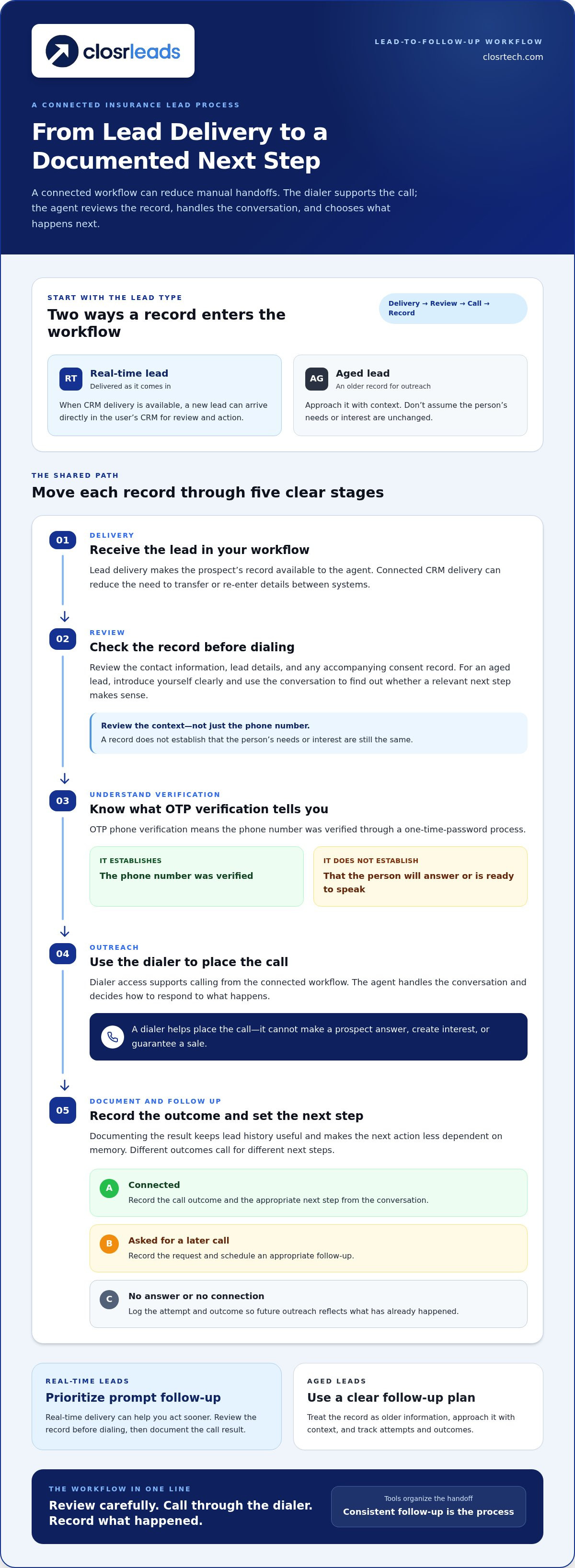
Lead delivery puts a prospect’s record in the agent’s hands. Dialer access provides a way to call that prospect. Together, they can move a record through review, outreach, and a documented next step with fewer manual transfers.
The handoff is important. Copying details from a lead source into a separate work queue takes time and can introduce data-entry errors. With real-time CRM delivery, a new lead can arrive directly in the user’s CRM, ready for review and action. The dialer supports the call. The agent decides how to handle the conversation and what follow-up to schedule.
What Happens When a Real-Time Lead Arrives?
Review the record before dialing. Check the contact information, lead details, and any accompanying consent record. OTP verification means the phone number was verified through a one-time-password process. It doesn’t mean the person will answer or is ready to speak. For more on phone verification, read this guide to OTP-verified insurance leads.
After reviewing the record, use the dialer to place the call and document the outcome in your workflow. A connection, a request for a later call, and no answer each call for a different next step. Recording the result keeps the lead history useful and prevents the next action from relying on memory.
How Should Agents Work Aged Leads Through a Dialer?
An aged lead is not a real-time inquiry. Approach it with context, and don’t assume the prospect’s needs or interest are unchanged. Review the record, introduce yourself clearly, and use the conversation to find out whether a relevant next step makes sense. Record attempts and outcomes so future outreach reflects what has already happened.
For example, an agent working Final Expense prospects can track whether a person answered, asked for a later call, or didn’t connect. The guide to Final Expense leads offers a vertical-specific perspective on working these prospects.
Keep call practices appropriate for your workflow. The Federal Trade Commission’s Telemarketing Sales Rule provides guidance on telemarketing requirements. Review the source and follow the rules that apply to your outreach.
If you want to reduce the gap between receiving insurance leads and calling them, explore how insurance leads and a built-in dialer can support a connected workflow. The tools organize the handoff; a clear follow-up plan makes the process consistent.
Bundled Dialer vs. Separate Lead and Calling Tools: What Should You Compare?
A bundle can reduce tool-switching and manual handoffs. Separate tools may fit better when they already work well with your CRM and calling process. Don’t compare only the number of platforms. Trace what happens to a lead from delivery through dialing, recordkeeping, and invalid-contact handling.
| Workflow detail | Bundled lead and dialer workflow | Separate lead source and dialer |
|---|---|---|
| Lead verification | Verification details can be presented with the lead. Check what the verification establishes. | Verification information may need to be reviewed across the lead source and calling workflow. |
| Delivery path | Leads and dialer access are brought together, potentially reducing manual transfers. | Records may need to move from the source into the dialer or work queue. |
| Dialing access | The dialer supports calling purchased leads within the connected workflow. | The agent works leads from one system and places calls through another. |
| CRM handoff | CRM delivery depends on the platform’s workflow and supported connection. | Handoff depends on how the separate lead source, dialer, and CRM work together. |
| Invalid contacts | Review whether the invalid-contact replacement policy is clearly explained. | Procedures depend on the lead source’s stated policy. |
Convenience matters, but it doesn’t replace clear lead details. Real-time records may arrive closer to the inquiry, while aged records call for context-aware outreach. Neither category is automatically the better fit. OTP verification means a phone number was verified through a one-time-password process. It doesn’t establish current interest or guarantee an answer. Look for clear information about consent records and how invalid contacts are handled.
Which Lead-Quality Details Matter Before Dialing?
Before calling, compare the lead’s age and available details, verification information, accompanying consent records, and the process for reporting an invalid contact. ClosrLeads’ leads are OTP phone-verified and include TCPA-compliant consent records. Invalid contacts are covered by a replacement guarantee. These details help agents understand the record and the stated handling process, but they don’t predict a sale.
How Do You Compare Workflow Fit and Accountability?
Map the lead’s route into your CRM or work queue. Can agents find the record, place a call, and organize the outcome without re-entering information? Then review how the setup handles invalid contacts and records activity. A dialer with leads included can simplify the handoff, but it’s most useful when the workflow fits your team’s routine.
Keep call practices aligned with applicable requirements. The FTC's Telemarketing Sales Rule provides guidance for telemarketing businesses. To see how a combined setup can support lead follow-up, explore this insurance lead and dialer workflow.
How to Set Up a Dialer-and-Leads Workflow for Consistent Agent Follow-Up
A reliable workflow starts before the first call. Decide which lead types you’ll work, prepare your CRM to capture useful details, set a clear calling routine, and review how the process is working. A dialer with leads included can reduce tool-switching, but agents still need clear steps for what to do next.
What Should Agents Organize Before the First Call?
Start by separating real-time records from aged leads. Their timing and context differ, so agents can prioritize appropriately instead of treating every record as equally new. Then prepare CRM fields that make the next step clear.
Keep the setup practical. Capture the lead’s source or type, contact details, consent information, latest call outcome, and next action or follow-up date. Review the available consent record and follow the calling requirements that apply to your outreach. Consistent records help agents pick up where the last attempt ended.
How Can Teams Improve Follow-Up Without Adding Friction?
Set a repeatable routine for reviewing new leads and making first contact. For example, an agent can review a newly delivered record, check its details, make an appropriate call attempt, and record the outcome immediately. If the contact asks for a later call, schedule it in the workflow. If there’s no connection, record that and follow the team’s established process for another attempt.
Use recorded outcomes to identify workflow problems, not to assume results. If records often lack key details or agents regularly miss scheduled follow-ups, adjust the relevant field or process. A simple set of dispositions, such as connected, no answer, follow-up requested, or invalid contact, helps keep records organized and makes gaps easier to spot.
Setup checklist
- Platform setup: Define lead categories, confirm how records reach the CRM or work queue, create fields for contact details and outcomes, and establish a clear way to schedule next steps.
- Daily agent habits: Review new records, follow the call routine, record each attempt accurately, and begin each work session by checking scheduled follow-ups.
Keep the routine easy to follow. When agents handle records consistently, teams can see where follow-up is delayed and make focused adjustments without adding unnecessary steps. Explore ClosrLeads to see how insurance leads and a built-in dialer can support an organized follow-up workflow.
How ClosrLeads Combines Insurance Leads With a Built-In Dialer
ClosrLeads brings insurance lead access and calling support into a connected workflow. Agents can work purchased real-time or aged leads using the built-in dialer, and real-time leads can be delivered directly into users’ CRM systems. Each step has a distinct role: the lead provides the record, the dialer supports the call, and the CRM helps organize lead information and activity.
Lead details matter before outreach begins. ClosrLeads’ leads are OTP phone-verified, which means the phone number was verified through a one-time-password process. This doesn’t promise the person will answer or indicate current purchase intent. Each lead sold also includes TCPA-compliant consent records, and invalid contacts are covered by a replacement guarantee.
What Does the ClosrLeads Workflow Include?
The built-in dialer supports agents as they work purchased leads, reducing the need to move between a lead source and a separate calling application. Real-time leads can be delivered directly into users’ CRM systems, where agents can review records and organize their work. CRM delivery and dialer access serve different functions. Agents can use lead details and call outcomes to guide next steps, while retaining responsibility for deciding what follow-up is appropriate.
Which Insurance Lead Types Can Agents Explore?
Available insurance lead types include Final Expense, Veteran, Trucker, Mortgage Protection, and IUL. For a vertical-specific example, explore this Final Expense lead guidance. Consider whether real-time or aged records better suit your outreach process, then build a follow-up routine around the lead details and your workflow. No lead type or dialer can guarantee a conversation or sale.
A connected setup is most useful when it fits the way you manage records and follow-up. Review the lead information, CRM workflow, dialer access, and invalid-contact policy as part of your evaluation. For a closer look at the combined approach, review the ClosrLeads lead and dialer platform and explore the workflow that aligns with your needs.
Put a More Connected Follow-Up Workflow Into Action
A dialer with leads included can make it easier to move from lead receipt to calling and organized follow-up. Choose a workflow that fits your process, review lead details before outreach, and record clear next steps. A dialer supports the work, but consistent agent follow-up remains essential.
ClosrLeads brings real-time and aged insurance leads across multiple verticals together with a built-in dialer. Real-time leads can be delivered into users’ CRM systems, helping reduce manual handoffs. Leads are OTP phone-verified and include TCPA-compliant consent records. Invalid contacts are covered by a replacement guarantee. These features provide useful workflow and lead-quality information without promising a particular sales result.
Ready to streamline the path from lead to first call? Explore ClosrLeads and get your lead follow-up moving. Build a steady process, stay organized, and make every follow-up step count.
Frequently Asked Questions
What Is a Dialer With Leads Included?
A dialer with leads included brings insurance lead access and calling into one working process. Agents can receive purchased lead records and use a built-in dialer to support outreach, rather than manually moving contact details between separate tools. Lead delivery, dialing, and CRM use remain distinct steps. The setup can reduce handoff friction, but it doesn’t guarantee that a prospect will answer or make a purchase.
Is a Dialer With Leads Included Worth It for Insurance Agents?
It can be worthwhile for agents who regularly follow up on purchased leads and want fewer manual steps between receiving a record and calling. The fit depends on how well lead delivery, dialing access, and CRM use match your process. Compare lead details and verification, the delivery path, and the invalid-contact policy. A convenient workflow can support consistent follow-up, but results still depend on the leads and how agents work them.
How Does an Insurance Lead Dialer Work?
An insurance lead dialer supports calls to prospects from purchased lead records. The agent receives or accesses a lead, reviews its available contact and consent information, and uses the dialer to place a call. Afterward, the agent records the outcome and any appropriate next step. With ClosrLeads, the built-in dialer supports working purchased leads, while real-time leads can be delivered directly into users’ CRM systems.
Can Leads From a Dialer Platform Go Directly Into My CRM?
Yes, when CRM delivery is part of the platform’s workflow. ClosrLeads can deliver real-time leads directly into users’ CRM systems, helping reduce manual transfers from the lead source to the work queue. CRM delivery and dialer access are related but separate functions. The CRM receives and organizes lead information, while the dialer supports calls. Platforms can handle this handoff differently.
Are OTP-Verified Insurance Leads Guaranteed to Answer?
No. OTP phone verification means a phone number was verified through a one-time-password process. It doesn’t guarantee that the person will answer, confirm current interest, or predict a sale. Treat verification as useful contact information, not a promise of connection. ClosrLeads’ leads include TCPA-compliant consent records, which provide additional information to review as part of your calling workflow.
Can I Use Aged Insurance Leads With a Built-In Dialer?
Yes. A built-in dialer can support calls to aged insurance leads as well as real-time leads. Aged records are older, so approach them with context and don’t assume the prospect’s needs or intent are unchanged. Review the available details, make an appropriate call, and record the outcome and next step. ClosrLeads supplies both real-time and aged insurance leads across multiple verticals.
What Should I Compare When Choosing a Dialer With Leads Included?
Compare lead verification, delivery, dialer access, CRM handoff, consent records, and invalid-contact handling. Check what OTP verification establishes and whether real-time leads can flow into your CRM. Consider how aged leads fit your process, too. ClosrLeads’ leads are OTP phone-verified, include TCPA-compliant consent records, and have a replacement guarantee for invalid contacts. Choose a workflow that fits your systems and supports consistent follow-up.
Ready to put a connected lead and calling workflow to work? Explore ClosrLeads’ insurance leads and built-in dialer.