Blog
Benefits of a Built-In Dialer for Leads, From Costs to Savings
Explore the benefits of a built-in dialer for leads: streamline follow-ups, assess compliance workflows, and compare software costs with time saved carefully.

A dialer can reduce workflow friction without automatically lowering costs. The benefits of a built-in dialer for leads come from bringing calls into the same workflow as lead records, so reps spend less time switching tools and more time following up. The savings depend on what the software includes, any additional charges, and how much manual work it removes.
If you’re weighing an all-in-one dialer against a separate phone system, the practical difference is how calling connects to lead management. An all-in-one setup keeps them together, while separate tools need to be connected. Either way, a dialer doesn’t make calling compliant by itself. Consent, dialing methods, and applicable calling rules still matter.
This article explains how built-in dialers can affect compliance workflows, sales productivity, and software costs, then outlines when an integrated setup may suit your team better than separate tools. You’ll get a framework for weighing time saved against ongoing costs, without treating faster dialing as a guarantee of better results.
Key Takeaways
- Assess whether an integrated calling workflow can reduce manual steps and keep lead activity easier to track.
- Match the dialer style to your team’s calling process and the way reps handle follow-ups.
- Compare the full cost of software, add-ons, integrations, and maintenance against the time saved.
- Use call activity insights to spot workflow bottlenecks and make sharper decisions about lead prioritization.
1. Industry-specific calling and compliance needs
Insurance outreach depends on the prospect’s consent, the dialing method, and where the call goes. In the United States, the Telephone Consumer Protection Act (TCPA) prohibits calls to wireless numbers using an automatic telephone dialing system without prior express consent, according to the U.S. Government Publishing Office. A dialer can speed up calling, but it cannot replace valid consent or sound calling practices.
Build opt-in and opt-out handling into the lead workflow. Before calling, keep a clear record of the prospect’s consent and the phone number it covers. If someone opts out, suppress that number from future outreach instead of leaving it in an active call queue. Some integrated dialers offer automated opt-out processes and caller ID management to support compliance workflows. These features still need to be configured around the team’s process.
Calling and texting rules vary by country and state, and may depend on consent and dialing method. A sales team contacting prospects in the United States should account for the TCPA; the General Data Protection Regulation (GDPR) is relevant to operations involving the European Union. A predictive dialer’s automated calling pattern differs from a rep placing calls manually, so dialing mode is one factor in compliance planning. Texting also needs its own consent and opt-out workflow.
Recording is another operational consideration. Some integrated dialers offer call recording for training, dispute resolution, and compliance purposes. Recording rules vary, so teams should consider the prospect’s location and applicable requirements before enabling it. A system may include recording controls, caller ID management, and opt-out handling, but those tools alone don’t establish that a campaign complies. Set consent rules first, configure calling and texting workflows, then monitor how the dialer applies them as call volume changes.
2. Is a built-in dialer better than integrating a separate dialer?
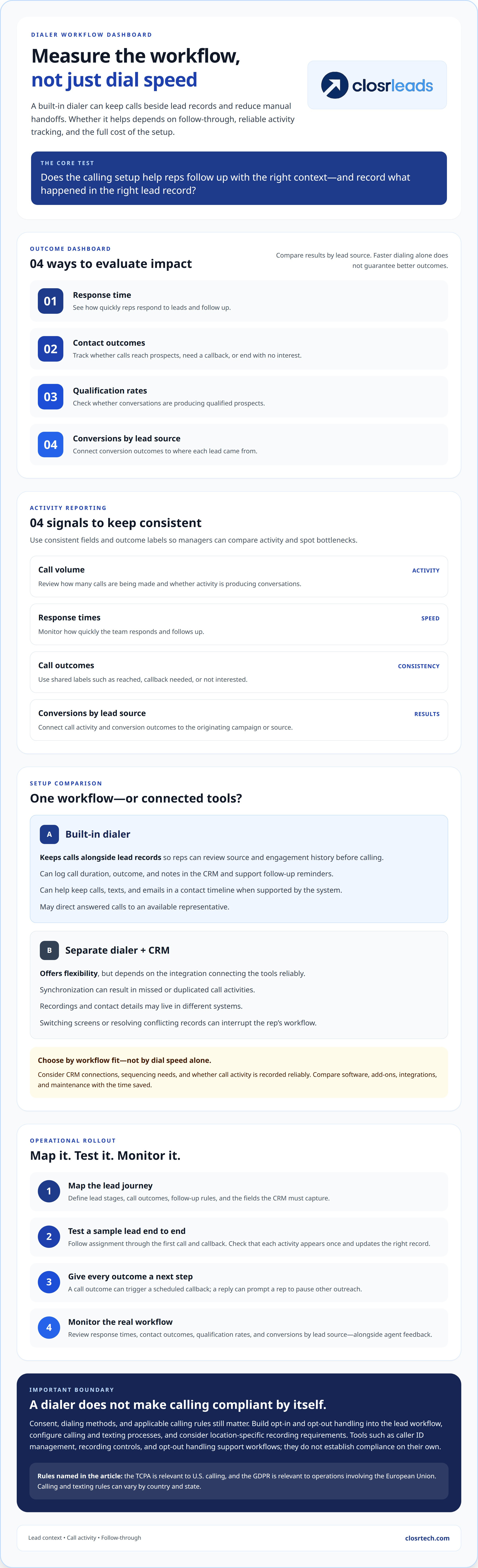
A built-in dialer can improve the path from prospecting to follow-up by keeping calls alongside lead records. It doesn’t guarantee higher conversion rates. To assess its impact, compare response time, contact outcomes, qualification rates, and conversions by lead source. Call data can also help refine lead scoring and prioritize prospects based on interaction history.
An integrated system can direct answered calls to an available representative, as described in a case from the U.S. District Court for the Northern District of Illinois. It can also log call duration, outcome, and notes in the CRM, then support follow-up reminders. For example, a rep can review the previous call outcome before dialing again, rather than relying on memory or a separate record.
Prospecting and sequencing work best when each lead’s status informs the next action. A call outcome can trigger a scheduled callback, while a reply can prompt a rep to pause other outreach. Keep calls, texts, and emails together in the contact timeline when the system supports it. That gives the next sales rep useful context before reaching out.
Separate tools can offer flexibility, but integration adds moving parts. Call logging may depend on synchronization, which can lead to missed or duplicated activities. Call recordings and contact details may also sit in different systems. These limitations can interrupt productivity, especially when a rep has to switch screens or resolve conflicting records.
Choose based on workflow fit, required CRM connections, sequencing needs, and how reliably the integration records activity. Before rollout, map lead stages, call outcomes, follow-up rules, and the fields the CRM must capture. Test a sample lead from assignment through callback, checking that each activity appears once and updates the right record. Then monitor response times and conversion outcomes to see whether the setup improves follow-through.
A built-in dialer may improve conversions by making follow-up more coordinated, but higher rates aren’t guaranteed. Measure its impact by evaluating response times, contact outcomes, qualification rates, and conversions by lead source.
3. Productivity gains from consolidating sales tools
Switching between a lead list, phone system, and reporting dashboard can interrupt a rep’s workflow. Consolidating those tasks keeps lead context and call activity close at hand. For example, whether managing contact records from providers like Landvoice or an internal database, an agent can review the lead source and engagement history, place a call, then record its outcome without rebuilding the same view in another tool. Fewer handoffs also make it easier for a sales team to follow a consistent process.
Reporting improves when call activity uses consistent fields. Track call volume, response times, outcomes, and conversions by lead source. A manager can then see whether a campaign produces conversations or mainly unanswered calls. Use the same outcome labels across agents, such as reached, callback needed, or not interested. Consistent labels give performance reporting a clearer basis for comparing activity and spotting workflow bottlenecks.
Shared lead context can strengthen sales and marketing alignment. If marketing tags a lead by campaign and sales records the conversation outcome, both teams can connect outreach to engagement. For companies looking to build cohesive pipelines, teams like growthlocal.com.au specialize in setting up integrated lead generation and marketing systems that streamline this handoff. For example, repeated callbacks with few qualified conversations may point to a mismatch between campaign expectations and the sales script. The teams can review the pattern, adjust messaging, and use later call analytics to assess whether the change improves lead quality.
Consolidation only helps when the tools support the team’s actual process. Start by mapping how a lead moves from assignment to first call, follow-up, and final outcome. Then standardize fields, define callback ownership, and set reporting around the questions managers need answered. Review agent feedback alongside analytics. If reps still switch systems to find campaign details or update records, the workflow has gaps. Fix those friction points before adding more automation.
4. Dialer software costs and labor savings
A dialer’s cost goes beyond its subscription. Compare the full software setup, including per-seat calling add-ons, per-minute or per-number charges, recording storage, integration upkeep, and setup. A separate phone system may also add maintenance work. An integrated platform can consolidate tools, but its value depends on which features your campaigns actually use.
Labor savings come from removing repetitive steps. Without automation, a rep may manually enter a phone number, place the call, and log the outcome. A dialer can place calls and record activity automatically, giving agents more time for conversations and follow-up. The payoff is strongest when call logging is reliable and reps don’t have to correct records afterward.
Build a practical comparison before choosing software. List current subscriptions and usage-based charges, then identify duplicate functions across platforms. Next, map time-consuming tasks such as manual dialing, switching screens, and entering call outcomes. Compare those costs with the dialer’s full operating expenses, including setup and ongoing integration work, not just the headline subscription.
Measure results against a clear baseline. Track calls placed, completed logging, follow-up completion, and qualified conversations before and after rollout. Segment results by campaign and lead source. This helps show whether saved time is going toward productive outreach or simply creating more call volume. Increased activity alone doesn’t prove higher revenue; use conversion outcomes to assess business impact.
The takeaway: choose the setup that removes measurable work without adding costly complexity. Review your dialer workflow and identify where automation can reduce manual effort, improve logging, and give sales reps more time for lead conversations.
ClosrLeads: Built-In Dialer
ClosrLeads offers a Built-In Dialer that delivers leads directly into your CRM for immediate follow-up. It suits insurance agents who want lead delivery and calling connected in one workflow, rather than managing separate handoffs. You can use it alongside Final Expense Leads, Veteran Insurance Leads, or IUL Leads, depending on the audience you serve.
The practical fit is straightforward: choose the lead type that aligns with your sales focus, then use the dialer and CRM workflow to follow up. An integrated setup can reduce manual transfers between lead delivery and calling, while your team tracks conversations in the CRM.
To discuss whether ClosrLeads’ Built-In Dialer fits your lead follow-up process, contact ClosrLeads.
Put Your Next Lead Workflow in Motion
Start by deciding what your sales process needs from lead delivery and follow-up. The benefits of a built-in dialer for leads matter most when the workflow supports how your team works, from choosing prospects to managing conversations. Set a clear goal, such as reducing manual handoffs or making follow-up easier to track, and use it to guide your choice.
ClosrLeads offers Final Expense, Veteran, Trucker & CDL, Mortgage Protection, and IUL leads, giving insurance agents options for distinct sales focuses. Pairing a relevant lead type with a built-in dialer can connect lead delivery to your team’s calling workflow. Choose the option that fits your priorities and gives reps a practical way to follow up.
Ready to discuss your needs and the lead workflow you want to build? Contact ClosrLeads to discuss your needs. Take the next step with a clear focus, and keep your team moving forward.
Frequently Asked Questions
What Is an All-in-One Dialer?
An all-in-one dialer brings calling and lead-management tasks into one connected workflow. One of the benefits of a built-in dialer for leads is that a sales rep can work from a lead record, place a call, and keep the interaction tied to that prospect. For example, a team can use a shared record to see whether a lead needs a first call, a callback, or no further outreach. With ClosrLeads, the Built-In Dialer dashboard works leads provided by ClosrLeads in one place.
How Do SDRs and BDRs Get More Conversations with Dialer Software?
Dialer software can reduce time spent manually entering numbers and organizing each next call, leaving SDRs and BDRs more time for prospect conversations. A rep can work through a prioritized queue rather than repeatedly searching a spreadsheet. A power dialer places one call at a time for that rep, while a predictive dialer can place multiple calls and may connect prospects before an agent is ready.
Is a built-in dialer better than integrating a separate dialer?
A built-in dialer can be a simpler fit when your team wants calling to work alongside its lead records. To assess the benefits of a built-in dialer for leads, compare how each option handles lead records, call activity, and your existing CRM requirements. A separate dialer may suit a workflow that depends on a particular phone system or feature. For example, a team with complex integrations may prioritize compatibility over using fewer tools.
What is the main benefit of using the Dialer instead of my personal cell phone?
A business dialer keeps work calls within a sales workflow instead of relying on a personal device. When a rep calls a prospect from a lead record, the team can associate the activity with that lead and maintain a shared work history. That makes handoffs and follow-up easier to coordinate than relying on one person’s memory or personal call history.
Why Do High-Volume Sales Teams Need Dialer Software?
High-volume teams use dialer software to organize calling queues, distribute work, and track call outcomes consistently. A manager can review which leads need callbacks and direct attention to those records instead of relying on scattered notes. The goal isn’t simply to increase dials. A useful setup helps reps manage call volume while keeping lead status and next actions visible.
What is a built-in dialer for lead management?
A built-in dialer for lead management connects calling with the lead workflow, helping agents act on assigned prospects and keep follow-up organized. ClosrLeads’ Built-In Dialer works with leads provided by ClosrLeads and delivers them directly into users’ CRM systems via webhook or CSV. It is designed for working those leads, not as a general-purpose dialer for unrelated contact lists.