Blog
How to Automate Insurance Prospecting: A Practical 2026 Guide
Learn how to automate insurance prospecting in 2026. Build practical workflows to capture leads, streamline CRM handoffs, and boost timely agent follow-ups.

What if the best way to automate insurance prospecting isn’t to automate the conversation, but to make sure it happens on time? When new leads arrive alongside active prospects and client work, manual follow-up can slip. The answer to how to automate insurance prospecting is a clear workflow that handles repetitive handoffs while agents stay in control of prioritization and personal conversations.
You don’t need a complicated tech stack to get started. You need a repeatable process: capture each lead, assign ownership, prompt timely follow-up, and track what happens next. A well-designed workflow helps prevent leads from sitting untouched without turning every interaction into a generic sequence.
This practical 2026 guide covers what to automate first, how to connect lead sources, your CRM, and follow-up tools, and when an agent should step in. You’ll also learn how real-time and aged leads can fit different follow-up plans, how a built-in dialer can reduce handoff friction, and which activity measures can help you improve the workflow without treating automation as a guarantee of results.
Key Takeaways
- Learn how to automate insurance prospecting by connecting lead capture, verification, assignment, follow-up, and outcome tracking.
- Give every prospect a clear owner and next action so new records don’t get lost in the pipeline.
- Compare reminders, CRM workflows, dialer-supported follow-up, and connected lead delivery to find a practical fit for your team.
- Start with one lead source and one workflow, then review missed handoffs, duplicates, and overdue tasks before expanding.
- Build distinct follow-up plans for real-time and aged leads, while keeping prospect decisions and meaningful conversations agent-led.
What Does It Mean to Automate Insurance Prospecting?
Insurance prospecting automation connects the steps involved in capturing a prospect, routing the record to an owner, prompting follow-up, and tracking the outcome. It’s more than an automatic text or email. A prospecting workflow coordinates lead capture, assignment, follow-up tasks, and outcome tracking; a single automated message handles only one touchpoint.
Prospecting begins with lead generation, the process of attracting and capturing interest. Automation carries that interest into the next steps without requiring an agent to move every record manually. A lead can enter a CRM, receive an assigned owner and next action, then trigger a reminder or permitted communication based on its status.
The goal is consistency, not autopilot. Automation can reduce data-entry delays, make ownership visible, and remind agents when a personal response is due. It can’t determine whether coverage fits someone’s needs, build trust, or guarantee a sale. Agents should lead qualification, product explanations, suitability discussions, and relationship-building.
Which Insurance Prospecting Tasks Should You Automate First?
Start with routine steps that are easy to define and verify. Automate lead entry, assignment, follow-up reminders, and activity logging before adding complex sequences. For example, a new lead can create a CRM task for its assigned agent. A status change can prompt the next reminder or flag a record for personal attention.
Keep judgment calls human. Agents should assess prospects’ needs, explain relevant options, and guide suitability discussions. Automation sets the stage; the agent handles the conversation.
What a Prospecting Automation Workflow Needs
Each record needs enough context to support a clear handoff: lead source, available consent information, assigned owner, current status, and next action. Connect the CRM with communication tools and lead delivery where appropriate, so agents don’t have to copy details between systems. ClosrLeads’ OTP phone-verified leads include TCPA-compliant consent records, and its built-in dialer supports real-time lead delivery into users’ CRM systems.
Define the handoff clearly. Specify which event creates an agent task, who owns it, and how the outcome should be recorded. This keeps follow-up visible without suggesting that automation alone ensures compliance or results.
How to Build an Automated Insurance Prospecting Workflow
A reliable workflow moves every prospect from arrival to a clear next step. To understand how to automate insurance prospecting, connect the lead source, CRM, and follow-up process, then define who owns each handoff. Automations should respond to meaningful events and recorded communication preferences, not send messages simply because a timer has run out.
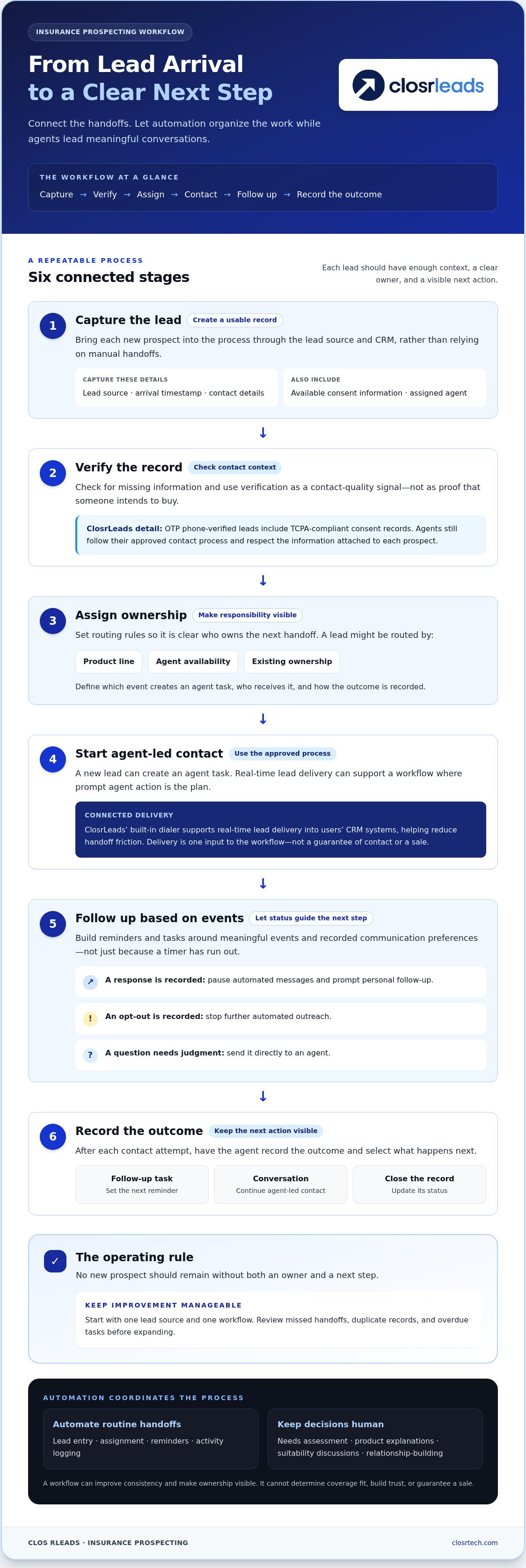
Workflow summary: Capture the lead so it enters the process; verify available information so the record is usable; assign an owner so responsibility is clear; contact the prospect through the team’s approved process; follow up based on responses and status; record outcomes so the next action is visible.
Set Up Lead Capture, Verification, and Assignment
Decide what information each new record must include. Capture the lead source, arrival timestamp, contact details, available consent record, and assigned agent. These fields give the team context and make missing data or unclear ownership easier to spot before follow-up begins.
Next, define clear routing rules. A lead might go to an agent based on product line, availability, or existing ownership. Use OTP phone verification as a contact-quality signal, not proof that someone intends to buy. ClosrLeads’ OTP phone-verified leads include TCPA-compliant consent records. Agents still need to follow their approved contact process and respect the information attached to each prospect.
Create Follow-Up Sequences and Agent Handoffs
Build reminders and tasks around the contact process your team has approved. A new lead can create an agent task. A recorded response can pause automated messages and prompt personal follow-up. An opt-out should stop further automated outreach, while a question or request requiring judgment should go directly to an agent. Give every trigger a defined action and owner.
Real-time lead delivery can support a workflow where prompt agent action is the plan. ClosrLeads’ built-in dialer supports real-time lead delivery into users’ CRM systems, helping reduce handoff friction. Learn more about real-time insurance lead delivery. Delivery is one input to the workflow, not a guarantee of contact or a sale.
Record Outcomes and Protect Ownership
After each contact attempt, have the agent record the outcome and select the next action, such as another follow-up task, a conversation, or closing the record. Set a rule that no new prospect remains without both an owner and a next step. This checkpoint makes unworked leads easier to catch and gives the team a useful record for improving the process.
Which Insurance Prospecting Automation Approach Fits Your Agency?
The best setup is the one your team will use consistently. A small agency may need only task reminders, while a team handling leads across multiple agents may benefit from CRM workflows or connected delivery. More features don’t automatically make a better process. Choose the simplest approach that makes ownership and the next action visible while leaving prospect decisions and conversations in agents’ hands.
Use this comparison to narrow down how to automate insurance prospecting for your team:
| Approach | Setup effort | Handoff visibility | Agent control | Best fit |
|---|---|---|---|---|
| Manual reminders | Low | Depends on consistent updates | High | Solo agents or low lead volume |
| CRM-native workflows | Moderate | Clear when tasks and statuses are maintained | High | Teams ready to standardize lead stages |
| Dialer-supported follow-up | Moderate | Can organize call activity | High when agents manage conversations | Agents handling regular phone outreach |
| Connected lead delivery | Varies by integration | Strong when records flow into the CRM | High when agents own next steps | Teams aiming to reduce manual transfer |
CRM Workflows, Dialers, and Integrated Lead Delivery
A CRM workflow can assign records, create tasks, and log activity against a prospect. A dialer helps organize calls, but shouldn’t make judgment calls for the agent. For organizations managing structured phone outreach, specialized communication providers like Calls-Are-Us deliver outreach solutions that complement internal follow-up processes. Integrated lead delivery can reduce duplicate entry between receiving a lead and beginning CRM follow-up. ClosrLeads’ built-in dialer supports real-time lead delivery into users’ CRM systems. This can streamline a handoff, but it doesn’t replace agent oversight or guarantee a particular outcome.
How to Balance Speed, Personalization, and Compliance
Fast follow-up only helps when it’s relevant and appropriate. Use details the prospect provided to personalize outreach, but don’t infer needs, product interest, or consent that the record doesn’t establish. Keep recorded consent and opt-out information visible, and configure each channel according to your team’s applicable contact rules.
OTP phone verification is a contact-quality signal, not proof of intent. A consent record provides useful context, but it doesn’t automatically make every future call, text, or email compliant. Keep agents responsible for meaningful conversations and sensitive decisions. Automation should prompt personal service, not replace it.
How to Launch and Measure Insurance Prospecting Automation
Don’t automate every lead source at once. Start with one source and one follow-up workflow, then confirm the handoff works before expanding. A focused pilot helps identify weak points without creating a larger queue of missed tasks or duplicate records. Start with a workflow you can observe, adjust, and measure.
Launch a Small, Controlled Prospecting Pilot
Write down what should happen at each stage before turning on the workflow. Specify the trigger, assigned agent, resulting message or task, and stop conditions. For example, lead arrival might create an assigned CRM task, while a recorded response pauses scheduled follow-up and prompts the agent to take over.
Test sample records from capture through CRM logging. Check that the correct owner is assigned, the expected task appears, and the outcome can be recorded. Once the workflow is active, ask agents where the handoff feels unclear or repetitive. Fix those friction points before routing more leads through it.
Use Metrics to Improve Follow-Up Quality
Track measures that show where prospects are getting stuck. Treat them as diagnostic signals, not universal benchmarks or promises of future sales.
- Time to first attempt: How long it takes from lead arrival to the first recorded outreach attempt.
- Contact rate: The share of assigned prospects agents successfully reach, using a consistent definition.
- Appointment rate: The share of prospects who proceed to a scheduled conversation, measured by lead source or follow-up stage.
- Opt-out patterns: Where prospects ask to stop outreach, so the team can review channel, timing, and workflow triggers.
Review these measures alongside missed tasks, failed handoffs, duplicate entries, and agent workload. Compare like with like: a lead source or follow-up stage may perform differently from another, so one overall number can hide where the process needs attention. Regular reviews can help the team improve timing and workflow design without treating automation as a guarantee of contact or conversion.
For related guidance on organizing lead records and follow-up, see our article on insurance lead management systems.
ClosrLeads leads and dialer tools can connect lead delivery with your CRM follow-up process.
Connect Insurance Prospecting Automation to Better Lead Follow-Through
A prospecting workflow works when its parts connect. Verified contact information gives agents a usable record to start with. Timely delivery puts that record into the process. Clear ownership identifies who acts next, and agent-led follow-up turns a reminder or dialer prompt into a real conversation. Reliable handoffs support better follow-through, while agents remain responsible for decisions.
Match Lead Delivery to Your Prospecting Process
Real-time and aged leads call for different operating plans. With real-time delivery, define which agent receives the record and what first action should follow while the prospect’s inquiry is fresh. A built-in dialer can support lead delivery into the CRM and reduce handoff friction, but the agent remains responsible for the conversation.
Aged leads need a deliberate re-engagement plan. Review the recorded contact history first, assign an owner, and make the next action clear. Don’t treat an older record like a new inquiry or assume it has the same context. ClosrLeads offers OTP phone-verified insurance leads across product categories, with real-time and aged lead options for different follow-up approaches. OTP verification supports contact quality; it doesn’t establish purchase intent.
To explore the lead types and related guidance, see the OTP-verified insurance leads pillar, the Final Expense leads guide, or the Mortgage Protection leads guide.
Choose a Clear Next Step for Your Agency
Start with the task that most often slips through the cracks. Trace the record: How does the lead enter the CRM? Who owns the first follow-up? Where does the agent log the attempt and next step? If any answer is unclear, fix that handoff before adding more automated steps.
Keep the process simple enough to maintain. Let automation move records, create prompts, and capture activity. Let agents assess needs, answer questions, and guide meaningful conversations. Clear records and consistent ownership help the team see where follow-through breaks down, without treating automation as a promise of sales.
ClosrLeads’ verified insurance leads and built-in dialer can support your agency’s follow-up workflow.
Put a More Reliable Prospecting Workflow in Motion
A stronger prospecting process doesn’t need to take control away from agents. Automate repeatable handoffs, give every lead a clear owner and next action, and keep qualification and meaningful conversations agent-led. Start with one workflow, then use response timing, contact outcomes, and missed tasks to identify what needs improvement.
The right workflow also depends on the lead. Real-time and aged leads need distinct follow-up plans, supported by accurate records and clear ownership. OTP phone-verified leads with TCPA-compliant consent records can provide useful information for that process. A built-in dialer supports lead delivery into users’ CRM systems, and a replacement guarantee applies to invalid contacts. These are workflow inputs, not promises of sales results or substitutes for agent judgment.
Ready to strengthen your lead handoff and follow-up process? Explore ClosrLeads leads and its built-in dialer to support your prospecting workflow.
Frequently Asked Questions
How do you automate insurance prospecting?
Automate the repeatable steps between receiving a lead and recording what happened. Capture the lead source and contact details, assign an agent, create a follow-up task, and log the outcome in your CRM. Set triggers around meaningful events, such as a new lead arriving or a prospect responding. To automate insurance prospecting effectively, make sure every record has a clear owner and next action, while agents lead personal conversations and decisions.
What tasks can insurance agents automate in a prospecting workflow?
Agents can automate lead entry, assignment, reminders, task creation, and activity logging. A new record might trigger an assigned call task, while a status change can prompt a follow-up reminder. These tools keep routine work visible and consistent. Keep needs assessment, product explanations, and suitability discussions agent-led. Automation can organize the next step, but shouldn’t make judgments about a prospect’s needs or send outreach without appropriate controls.
Can insurance prospecting be automated without losing personal follow-up?
Yes. Use automation to prompt and prepare personal service, not replace it. A CRM can route a prospect to an agent, surface relevant information, and remind the agent to follow up. The agent should take over when a prospect responds, asks a question, or needs help assessing options. Clear handoff rules keep the workflow moving while preserving the judgment, context, and relationship-building that an automated message can’t provide.
Is insurance prospecting automation compliant with the TCPA?
Automation alone doesn’t make prospecting compliant with the TCPA. Compliance depends on factors such as the contact method, consent information, and how the workflow is configured. Keep consent records available, respect opt-outs, and ensure your team follows applicable requirements for each outreach channel. OTP phone verification can support contact quality, but it doesn’t establish purchase intent or authorize every future call, text, or other contact.
How does a CRM help automate insurance lead follow-up?
A CRM helps organize follow-up by storing prospect records, assigning ownership, creating tasks, and logging contact activity. For example, receiving a lead can create a task for a specific agent, and recording a response can update the next step. This makes overdue or unworked records easier to spot. A CRM supports the workflow, but agents still need to review the record, follow approved contact procedures, and lead meaningful conversations.
What is the difference between real-time and aged insurance lead automation?
Real-time and aged leads call for different follow-up plans. Real-time delivery fits a process where an available agent is assigned a prompt first action after the lead arrives. Aged leads need a deliberate re-engagement approach that accounts for recorded contact history and current status. Treating both the same can create mismatched follow-up. In either workflow, assign an owner, define the next action, and record the outcome.
How do you measure whether insurance prospecting automation is working?
Track time to first attempt, contact rate, appointment rate, overdue tasks, duplicate records, and opt-out patterns. Compare results by lead source and follow-up stage to see where the process is working or breaking down. Use the measures as diagnostic signals, not universal benchmarks or promises of sales. Review them regularly with agent feedback, then adjust triggers, task ownership, or handoffs when the data reveals friction.