Blog
Compare insurance agency dialers for calling productivity
Find the best insurance dialer for productivity with a practical comparison of dialing modes, CRM integration, call analytics, and features that improve foll...

More calls don’t automatically mean more productive calls. The best insurance dialer for productivity matches the agency’s team size, lead workflow, and follow-up process, while making it easier to see what happens after each call. An auto dialer handles outbound dialing so agents can spend less time manually placing calls and more time speaking with prospects. The right setup still depends on how your team works.
A faster dialing process matters, but so do agent controls, CRM integration, reporting, and the dialing mode that fits your operation. This guide explains how insurance agency dialers work and compares productivity features across about 10 options. You’ll also learn how call analytics can support performance reporting and coaching, and what to weigh when choosing between preview, power, and predictive dialing. The goal is a practical comparison that helps you identify the features that can streamline your calling workflow without losing sight of conversation quality.
Key Takeaways
- Match preview, power, or predictive dialing to your team’s workflow and how much control agents need over each call.
- Use CRM integration and call logging to keep prospect activity organized and make follow-up easier to manage.
- Turn call analytics into useful reports by tracking patterns that help identify workflow gaps and coaching opportunities.
- Consider ClosrLeads’ Built-In Dialer when you want insurance leads delivered into your CRM for follow-up.
What is an Auto Dialer?
An auto dialer automates outbound calls from a selected contact list. Instead of entering each number manually, insurance agents use dialing modes to work through assigned contacts. A preview dialer displays a contact before the call, giving the agent time to review relevant CRM details. Depending on its features and setup, the software can also record call outcomes.
CRM integration connects dialing activity with customer records. A useful integration brings contact details into the caller’s workflow and logs outcomes, notes, or follow-up tasks in the CRM. For example, marking a prospect as needing a callback can keep that next step visible in the record. Confirm which fields sync, whether updates flow both ways, and how duplicate records are handled.
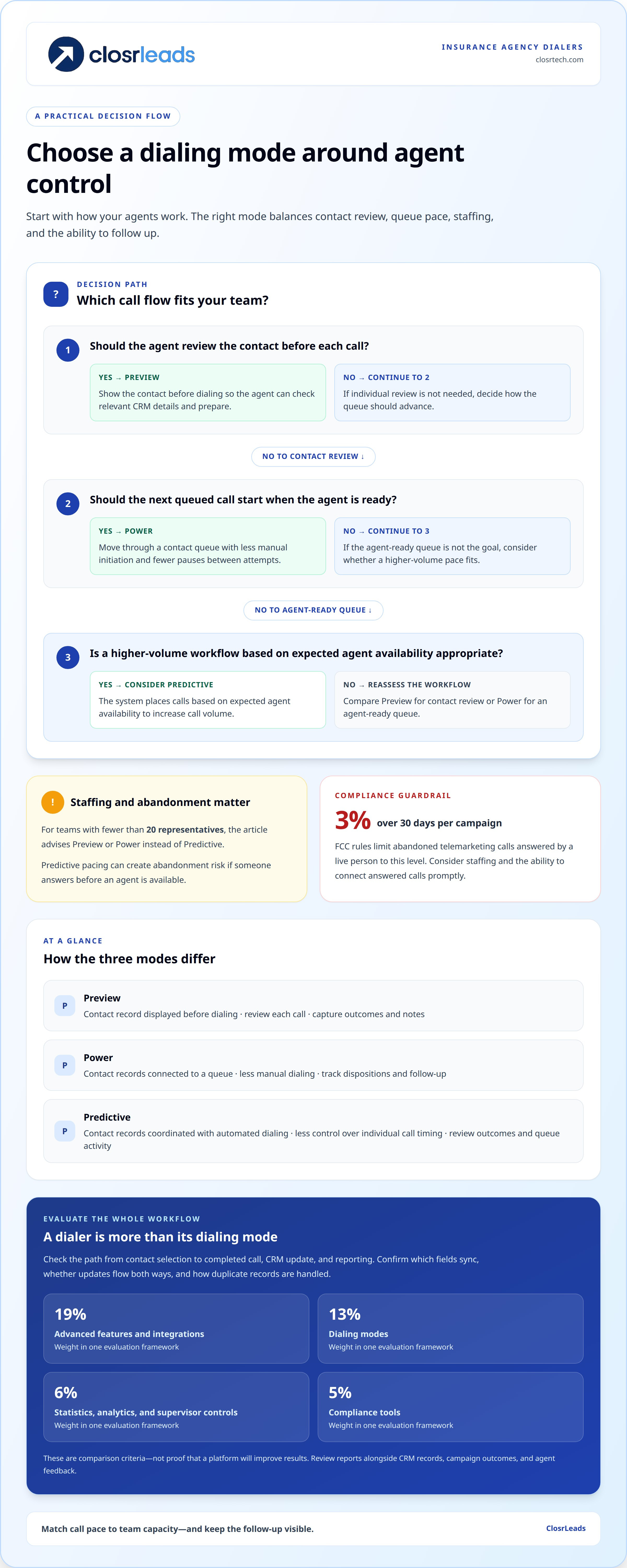
Some platforms offer native CRM connections; others can use automation tools such as Zapier to pass information between compatible apps. That can support workflows such as creating a CRM task after a call disposition is selected. Integration quality matters: a broken or incomplete sync can leave agents switching screens or entering the same details twice. Advanced features and integrations carry 19% weight in one evaluation framework, while dialing modes carry 13%.
Consistent call logging makes analytics more useful. An outcome label such as “callback requested” helps managers compare activity and identify follow-up gaps. Before choosing software, map the full path from contact selection to completed call, CRM update, and reporting.
| Dialing option | CRM handoff | Agent control | Logging focus |
|---|---|---|---|
| Preview | Display the record before dialing | Review before each call | Capture outcomes and notes |
| Power | Connect contact records to the dialing queue | Move through contacts with less manual dialing | Track dispositions and follow-up |
| Predictive | Coordinate contact records with automated dialing | Less control over individual call timing | Review call outcomes and queue activity |
Choose a dialer whose CRM workflow keeps records accurate and provides the level of call-by-call review your agents need.
So, What Is Insurance Agency Dialer Software?
Insurance agency dialer software automates outbound calling and organizes agent workflows. In 2026, compare preview, power, and predictive modes against team size, call control, and abandonment risk.
Automated Dialing for Insurance Agents
An auto dialer selects contacts and starts calls automatically, reducing manual number entry. Its value depends on how it handles each call before, during, and after connection. With preview dialing, an agent reviews the prospect first. Power dialing moves through a queue with less manual initiation. Predictive dialing prioritizes volume, making it a better fit for a different operating pace.
For teams with fewer than 20 representatives, preview or power dialing is advised instead of predictive dialing. That distinction helps agencies match the software to available agent capacity, rather than choosing a mode for speed alone.
Predictive, Power, and Preview Modes
Preview dialing lets agents review a contact before placing each call. Power dialing starts the next call in a queue when the agent is ready, reducing pauses between attempts. A predictive dialer places calls based on expected agent availability to increase call volume. This can create abandonment risk if someone answers before an agent is available.
Federal Communications Commission rules limit abandoned telemarketing calls answered by a live person to 3% over 30 days per campaign. Agencies comparing modes should consider call pace alongside staffing and their ability to connect answered calls promptly.
Insurance Dialer Options and Costs
The right option depends on your agency’s workflow, not a universal brand ranking. Compare preview-focused systems when agents need time to review contacts, power dialers for a steady queue, and predictive dialers for higher-volume workflows. Then assess CRM fit, call logging, reporting, and follow-up controls. These criteria help distinguish useful software from a dialing mode that simply increases activity.
Leading dialer costs vary by seat count, dialing modes, integrations, and contract structure. Pricing depends on the case and is given after a quote request. Compare the total features included, not just a per-user or monthly figure, so the software’s workflow and reporting fit the agency’s needs.
Call analytics, reporting, and coaching
Dialer analytics turn campaign activity into operational decisions. Track relevant measures, review calls, and use the findings to improve agent workflows while keeping compliance visible.
Call Tracking and Performance Analytics
Call tracking records activity such as attempts, connections, outcomes, and callbacks. Reports can group these measures by agent or campaign, helping managers spot patterns that manual notes may miss. For example, repeated unanswered attempts can prompt a review of contact timing or lead quality. Predictive dialing reports can also help teams compare planned call volume with agent availability.
Evaluation frameworks assign 6% weight to statistics, analytics, and supervisor controls, and 5% to compliance tools. Treat these as comparison criteria, not proof that a platform will improve results. Review reporting alongside CRM records, campaign outcomes, and agent feedback.
Call monitoring adds context that totals alone cannot provide. A supervisor can review a recorded interaction, identify where an explanation became unclear, and coach the agent on that moment. This makes feedback specific and grounded in an actual conversation rather than a general reminder.
Call Recording and Voicemail Drops
Call recording preserves conversations for review, training, and quality checks, subject to the agency’s procedures. Voicemail drops let agents leave a prepared message after reaching voicemail instead of repeating the same script manually. These tools serve different purposes: recordings support review, while voicemail drops standardize follow-up. Local presence settings can also affect how a caller’s number appears, so include them in campaign reporting when used.
Compliance belongs in the reporting workflow, not in a separate spreadsheet. The Federal Trade Commission says federal rules prohibit telephone solicitations to homes before 8 a.m. or after 9 p.m. in the recipient’s local time. For U.S. campaigns, unsolicited telemarketing robocalls using autodialers require prior written consent under the regulations described. Power dialer use must comply with the Telemarketing Sales Rule, and businesses must maintain a Do Not Call list. Track campaign procedures alongside call outcomes, consent records, and suppression activity.
How insurance agency dialers improve calling productivity
Dialers can improve productivity by reducing manual pauses and clarifying the next action. Results depend on how well the platform fits the prospect’s needs and the agent’s workflow.
Productivity Gains from Dialers
A power dialer can move an agent from one assigned prospect to the next without repeatedly entering numbers. That cuts a specific source of friction: switching between a contact list, phone controls, and call notes. A good dialer can increase connection rates by two to five times, but dialing speed alone doesn’t ensure productive conversations. Agents still need relevant lead details and a clear follow-up action.
Use the interface to keep the immediate task visible. For example, display the prospect’s contact record before the call, then make the outcome easy to record afterward. Monitoring can reveal where agents lose time, such as long pauses between calls or incomplete dispositions. Managers can then adjust the workflow instead of pushing for more calls without identifying the bottleneck.
Dialer Workflow Setup and Optimization
Build the workflow around the path from assigned prospect to completed follow-up. First, organize contacts by campaign or insurance interest. Next, choose preview dialing when agents need time to prepare, or power dialing when a steady queue better suits their calling routine. Then define clear outcomes, such as reached, callback requested, or unable to connect.
Test the process in the agent interface before expanding it across a team. Confirm that contact details appear at the right time, completed calls create usable records, and callback tasks remain visible. Review results by agent and campaign. If monitoring reveals repeated delays after calls, simplify the outcome choices or remove unnecessary screen changes. The best insurance dialer for productivity helps agents complete each step cleanly, not just place calls faster.
Ready to streamline follow-up from lead assignment through calling? Explore a connected insurance lead workflow.
ClosrLeads: Built-In Dialer
ClosrLeads pairs its Built-In Dialer with insurance leads delivered directly to your CRM for follow-up. It’s a practical option when your agency wants to shorten the gap between receiving a lead and starting outreach.
Choose from Final Expense Leads, Veteran Insurance Leads, or IUL Leads to match your sales focus. Every lead is OTP phone-verified, and disconnected, wrong-number, or invalid contacts are credited or replaced per policy. ClosrLeads delivers leads to your CRM by webhook or CSV, and its Built-In Dialer supports follow-up in one workflow.
If your priority is coordinating lead delivery and outbound calling, ClosrLeads brings both into one workflow. Contact ClosrLeads to discuss insurance leads and the Built-In Dialer.
Turn your dialer choice into a stronger workflow
Make a focused decision rather than hunting for another feature. Choose a workflow your agents can use consistently, then set a clear operating goal: fewer manual handoffs, cleaner call records, or more reliable follow-up. The best insurance dialer for productivity supports that goal without adding friction to each conversation.
ClosrLeads offers Final Expense Leads, Veteran Insurance Leads, and IUL Leads alongside its Built-In Dialer. This can suit agencies looking to align lead selection with calling and CRM follow-up. Keep the evaluation practical: match the lead category to your sales focus, then consider how the dialer fits your team’s workflow.
Ready to explore the next step for your agency? Contact ClosrLeads to discuss your dialer. A clear workflow gives your team a stronger starting point for every call.
Frequently Asked Questions
What features make an insurance sales dialer productive?
Look for dialing controls, clear call outcomes, useful reporting, and a workflow that keeps prospect details accessible. The best insurance dialer for productivity helps agents move from call to follow-up without losing context. For example, agents should be able to record a requested callback and find that task later. Also assess whether supervisors can review activity by campaign and identify recurring process delays.
How do insurance dialers compare on power, predictive, and preview dialing?
Preview dialing gives agents the most time to review a contact before calling. Power dialing moves through a queue with less manual number entry. Predictive dialing prioritizes call volume by placing calls based on anticipated agent availability, which can raise abandonment risk if answered calls outpace available agents. Compare modes based on agent capacity and the level of control your conversations require, not speed alone.
Which insurance dialers integrate with popular agency CRMs and quoting platforms?
Integration support varies by dialer, CRM, and quoting platform, so compatibility depends on the specific workflow. ClosrLeads delivers leads to a user’s CRM through webhook or CSV. This describes lead delivery, not a named connection to every CRM or quoting system. Map the records and fields your agency needs to transfer, then assess whether webhook or CSV delivery fits that process.
Which dialers support compliant call recording, consent tracking, and do-not-call lists?
When comparing dialers, assess whether their workflow supports recording access, consent records, and suppression of contacts on a Do Not Call list. These tools can help organize records, but software alone does not establish that every campaign follows applicable requirements. Keep consent information associated with the relevant contact and make sure suppressed numbers do not re-enter an active calling queue.
How much can an insurance dialer improve calls per hour, contact rates, and sales conversions?
A good dialer can increase connection rates by two to five times. That figure doesn’t establish a fixed increase in calls per hour or sales conversions. Those outcomes depend on factors such as agent availability, prospect fit, follow-up, and call handling. Track each measure separately: attempts, live connections, meaningful conversations, and completed sales. That shows where dialing efficiency changes and where other parts of the process matter.
What should small insurance agencies consider when choosing a dialer?
Small agencies should prioritize agent control, CRM fit, clear call logging, and a mode suited to available staffing. Teams with fewer than 20 representatives are advised to use preview or power dialing instead of predictive dialing. Consider whether agents can manage callbacks and campaign records without adding extra manual steps. A simpler workflow can be more useful than high-volume automation that exceeds the team’s capacity.